What happens when a critical part wears out, breaks, or needs to be modified, but its original CAD file is nowhere to be found?
Whether it’s an aging boat propeller or an engine block with no existing mold, recreating a component without its original design data can be a challenge.
That’s where Geomagic Design X comes in.
By turning 3D scan data into fully editable, parametric CAD models, Design X makes it possible to reverse engineer existing parts without starting from scratch. And because it’s designed to work seamlessly with SOLIDWORKS, you can take your reconstructed geometry straight into a familiar design environment.
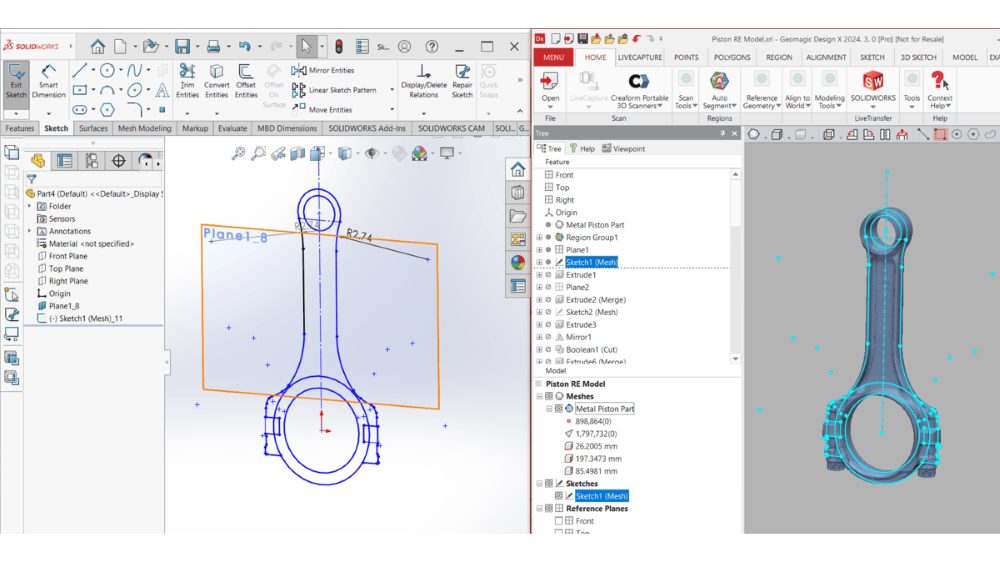
But reverse engineering isn’t just about making an exact copy. It’s about understanding how a part was originally designed, identifying what matters, and rebuilding it in a way that gives you the flexibility to make improvements.
And what if you need to design a new part that fits an existing one?
Design X makes that possible, too. Its deviation analysis tools help you evaluate the geometry of scanned components, identify critical dimensions, and design new parts that fit and function as intended.
Geomagic Design X: More Than Just a Modeling Tool!
Turning a 3D scan into an editable CAD model is only part of what Geomagic Design X can do.
If you’re using a compatible 3D scanner, you can capture scan data directly in Design X, without switching between multiple software applications.
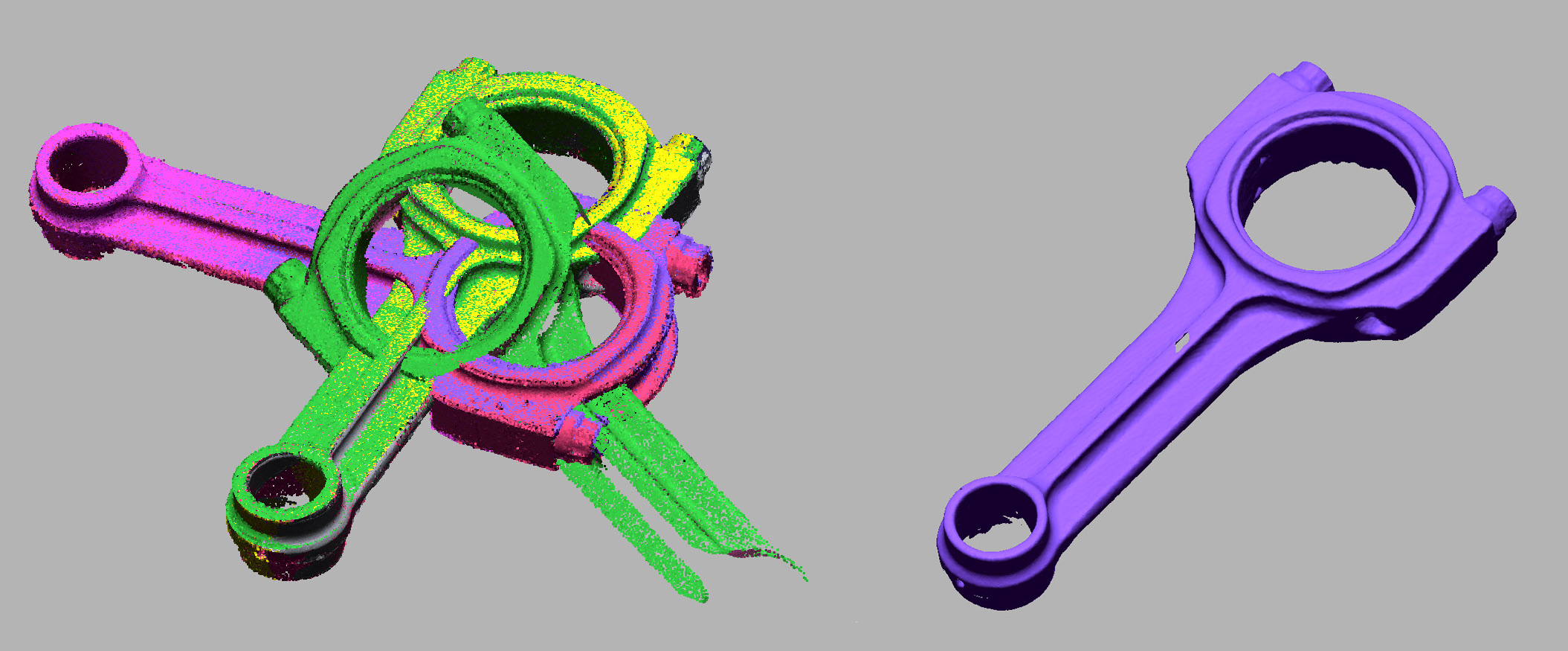
From there, you can align multiple scans, remove unwanted noise, and adjust their orientation to create a clean, usable point cloud.
Once the data has been processed, you can convert it into a 3D mesh, giving you the foundation you need to begin rebuilding your part.
Already Have a 3D Scanner and Scanning Software? No Problem!
You don’t need to change your existing scanning workflow to take advantage of Design X.
At Solidxperts, for example, we regularly use Artec 3D scanners to capture physical parts. Since Artec scanners come with their own scanning and processing software, much of the cleanup can be completed before importing the finished mesh into Design X.
The result? You can continue using the scanning tools you already know while taking advantage of Design X’s parametric modeling capabilities.
How Does 3D Reverse Engineering Actually Work?
Once your mesh is clean and ready, the real reverse engineering begins.
Instead of treating the scanned part as a fixed shape, Geomagic Design X helps you understand how it was originally built.
The software analyzes the geometry to identify important design features, such as reference planes, hole axes, symmetry, and other geometric relationships.
These elements then become the foundation for rebuilding the part using sketches, surfaces, and parametric features.
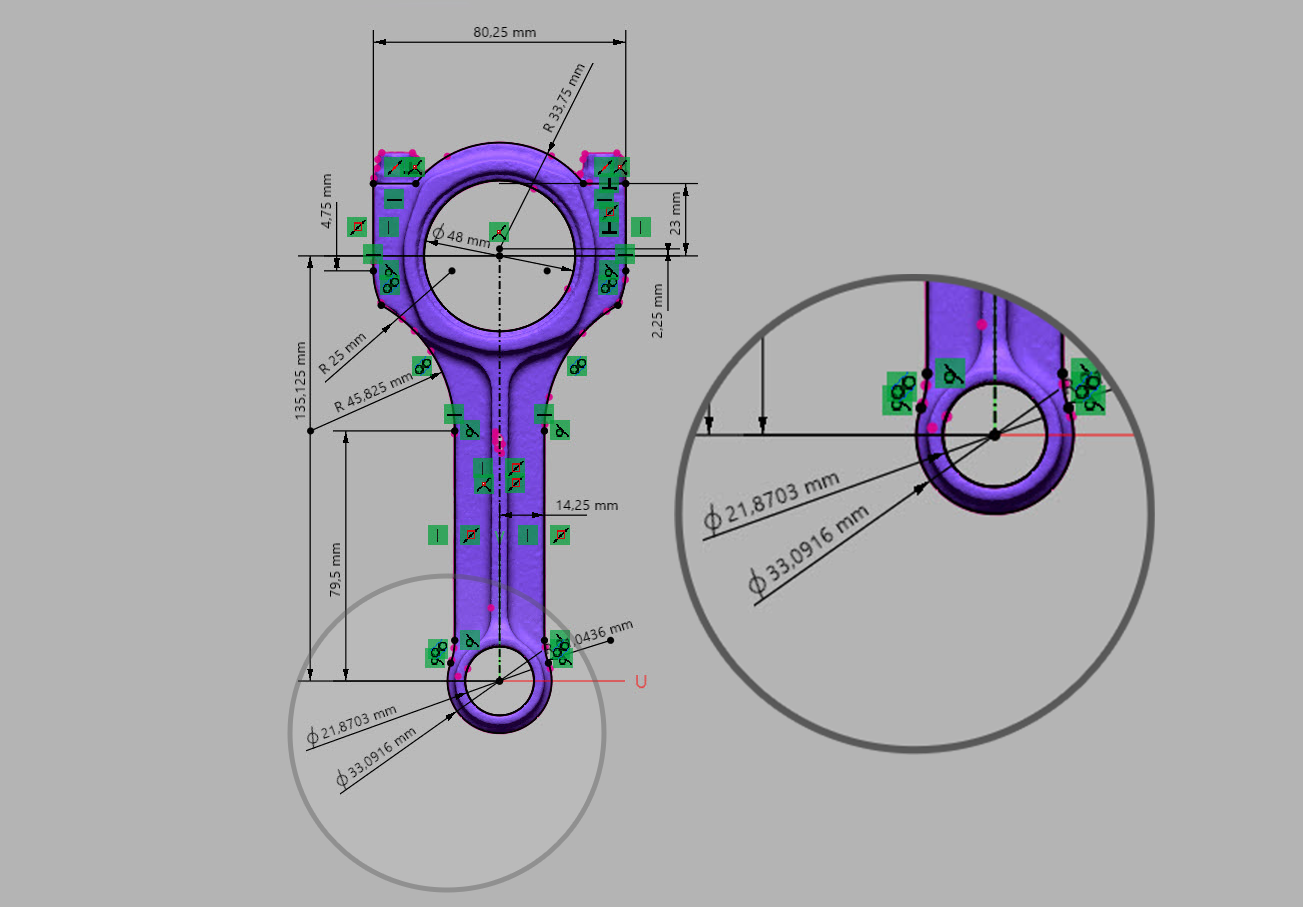
One particularly useful tool is Mesh Sketch, which analyzes mesh geometry and generates sketches based on the scanned data.
Rebuild the Design Intent, Not the Imperfections
Here’s where reverse engineering gets interesting.
A scanned part isn’t necessarily a perfect representation of its original design. Wear, manufacturing variations, and scanning noise can all introduce small irregularities.
Instead of reproducing every imperfection, Mesh Sketch helps identify the geometry that was likely intended in the first place.
For example, it can recognize whether a scanned profile was meant to be a straight line, an arc, or a circle.
From there, you can refine the dimensions to create a cleaner, more logical model.
Take the example above. If a scanned hole measures 21.8703 mm in diameter, chances are the original designer didn’t specify that exact dimension.
Rather than reproducing it blindly, you can adjust it to a more practical value that reflects the intended design, provided it meets the part’s functional requirements.
That’s the difference between copying a shape and rebuilding a usable CAD model.
Why Not Just Use the Original 3D Scan?
If you already have a 3D scan of your part, why go through the trouble of reconstructing it?
The answer comes down to how you plan to use it.
A typical 3D scan produces a mesh made up of thousands, sometimes millions, of tiny triangles. While this provides an accurate representation of the scanned surface, it doesn’t give you the same control as a parametric CAD model.
A surface that should be perfectly flat, for example, is still represented by a collection of triangular facets. Scanning can also introduce noise, gaps, or irregularities that make the geometry difficult to work with.
For applications such as precision machining or mold design, this can become a problem. You often need clean surfaces, defined dimensions, and editable features rather than raw mesh data.
But not every project needs a parametric model.
If your goal is to reproduce an object exactly as it was scanned, a clean, watertight mesh may be all you need.
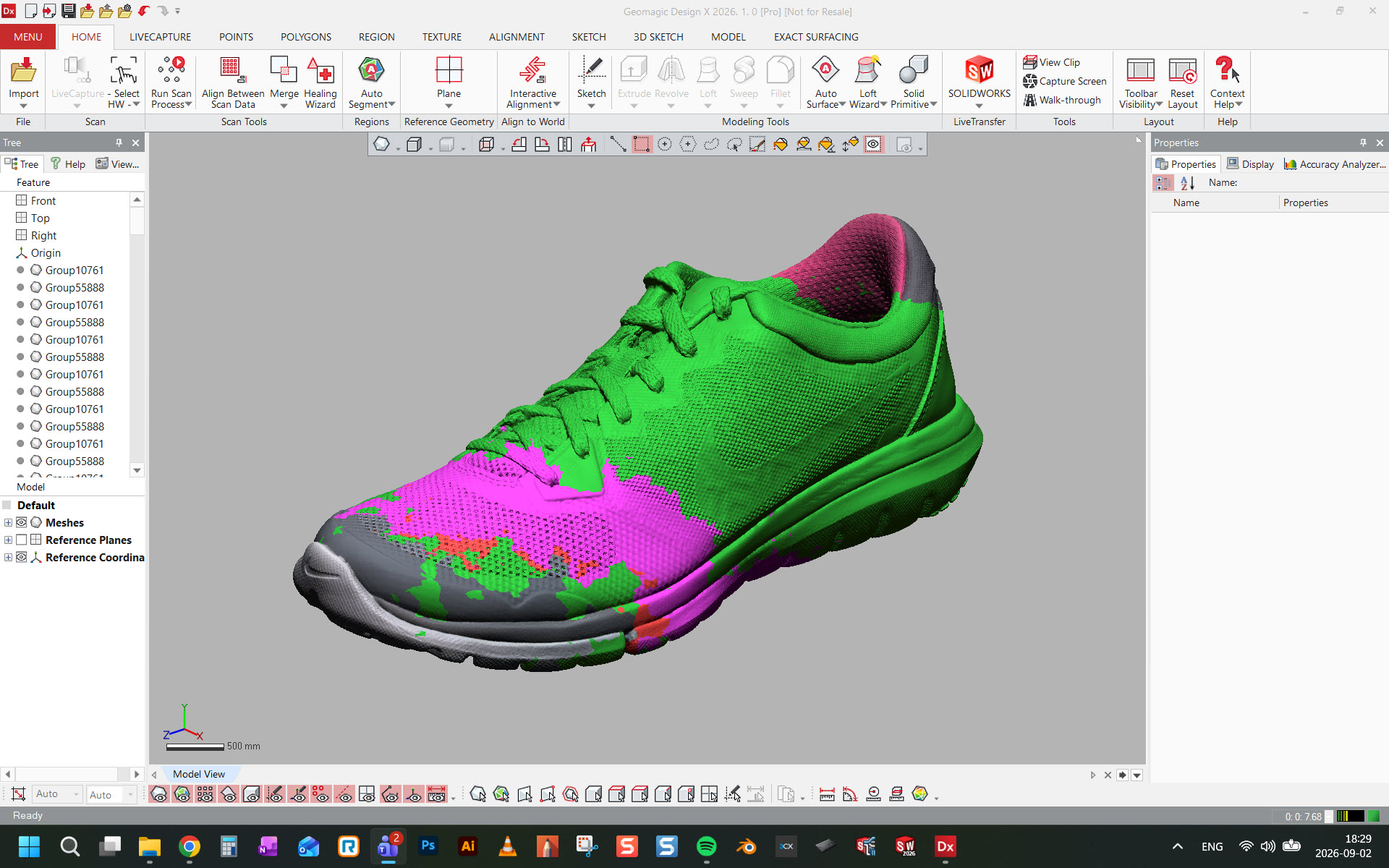
This is especially true for objects with complex organic shapes, such as sculptures, textiles, or footwear, where creating a fully parametric model may add unnecessary complexity.
Take this 3D scan of a sneaker from Artec, for example.
Its complex geometry would be challenging to rebuild using traditional parametric features. However, the scan itself can serve as a reference or potentially be prepared for 3D printing without a complete reverse engineering process.
How Do You Know Your Reconstructed Model Is Accurate?
Rebuilding a model is one thing. Making sure it matches the original part where it matters is another.
That’s where deviation analysis comes in.
Design X compares your reconstructed CAD model against the original scanned mesh and displays the differences using a color map.
This makes it easier to identify areas that fall within your specified tolerances and those that may need further refinement.
Of course, accuracy requirements aren’t the same for every application. An aerospace component may require much tighter tolerances than a consumer product or certain mold components.
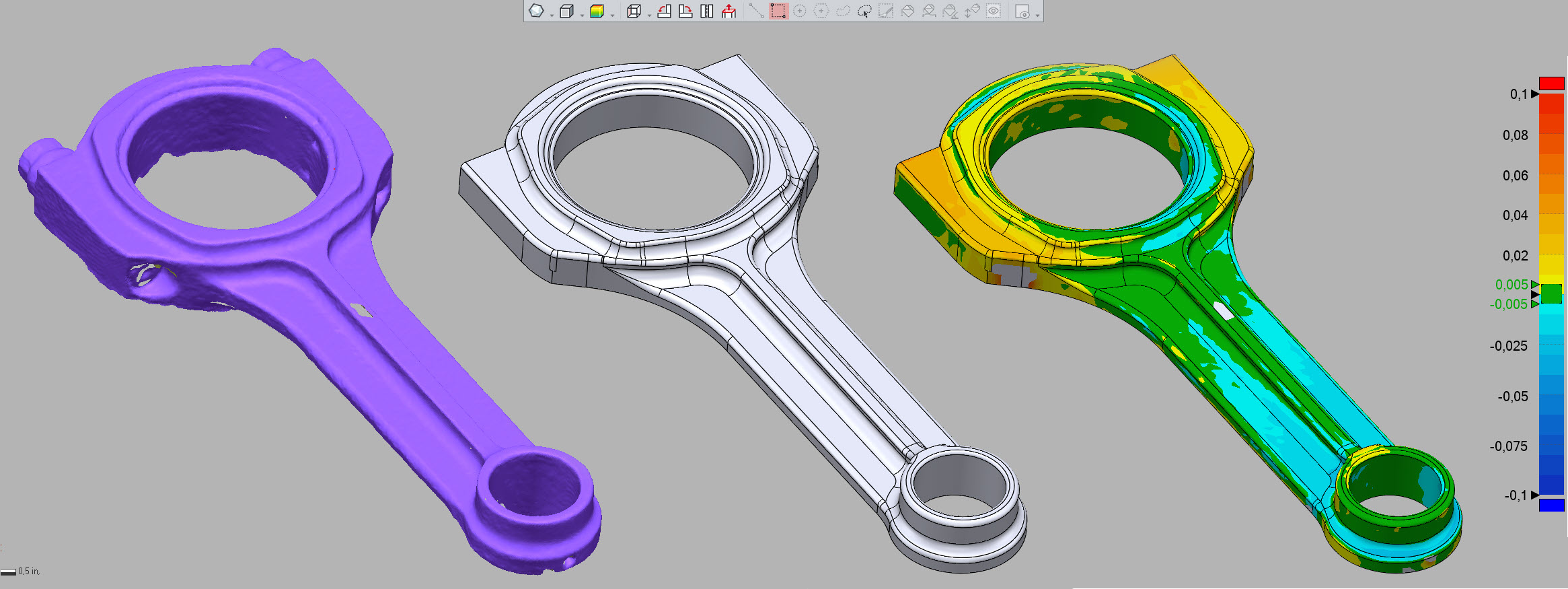
In this example, green areas indicate geometry within the specified tolerance of ±0.005 inches. Areas exceeding that threshold appear in a color gradient, with the analysis configured to display deviations up to ±0.01 inches.
The goal wasn’t to create a perfect copy of every scanned surface. Instead, we wanted to confirm that critical features, particularly the axes, remained within the required tolerances.
This is also where combining Design X with SOLIDWORKS becomes especially valuable.
By validating critical geometry in Design X first, you can establish a reliable foundation before moving into SOLIDWORKS to refine the overall model.
It’s a practical way to focus your efforts where precision matters most, without spending unnecessary time reproducing every detail.
Where Is Geomagic Design X Used?
From replacing discontinued components to developing custom products, reverse engineering plays an important role across many industries.
Here are a few examples of how Geomagic Design X can be used:
-
Tooling and Mold Making: Reconstruct worn or damaged mold components, modify existing tooling, or develop replacement parts.
-
Automotive and Motorsports: Digitize existing components to improve their design, create custom replacements, or develop new variations.
-
Aerospace and Defense: Reconstruct complex geometries while evaluating critical features against demanding tolerance requirements.
-
Medical: Use scanned anatomical data to support the development of customized prosthetics and medical devices.
-
Consumer Products: Recreate discontinued parts, improve existing designs, or adapt products to new requirements.
From 3D Scan to CAD: Give Existing Parts a New Purpose
Whether you’re replacing a part with no existing drawings, improving an outdated component, or designing something entirely new, Geomagic Design X helps bridge the gap between physical objects and editable CAD models.
And with its integration into SOLIDWORKS, the process doesn’t stop at reconstruction. You can refine dimensions, optimize features, and continue developing your design with greater control over its geometry and critical tolerances.
Have a reverse engineering project in mind? Our experts can help you choose the right tools and integrate Geomagic Design X into your existing design workflow.