What’s New in SOLIDWORKS 2025 Part 3: Simulation Reimagined

BLOG

What’s New in SOLIDWORKS 2025 Part 3: Simulation Reimagined

[techtips_featured_image_shortcode]

SOLIDWORKS 2025 brings a new era of simulation capabilities, in partnership with the 3DEXPERIENCE platform, redefining how engineers validate designs and optimize workflows. With cutting-edge features like the General Spring Connector, enhanced surface bonding interactions, and performance improvements for large assemblies, this year’s release empowers users to achieve greater accuracy and efficiency in their simulations.
 

Download the PDF


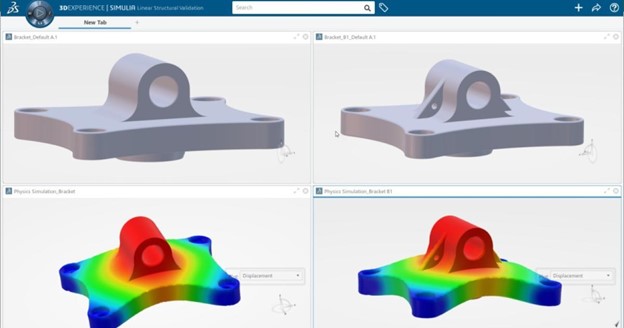
A simulation interface from the 3DEXPERIENCE platform showing a 3D model of a bracket with two views.


Engineers can now streamline complex setups, precisely analyze plastic warpage, and handle fluid dynamics with ease, all while benefiting from improved usability and faster meshing processes. This blog explores the key simulation upgrades in SOLIDWORKS 2025, offering insights into how these tools transform the engineering experience.


Intro

In the world of engineering and design, simulations are the backbone of validation. They ensure products perform as intended, withstand real-world conditions, and remain cost-effective. With the release of SOLIDWORKS 2025, simulation capabilities have reached new levels, offering more precise results, streamlined workflows, and advanced usability improvements that empower engineers to work smarter, not harder.
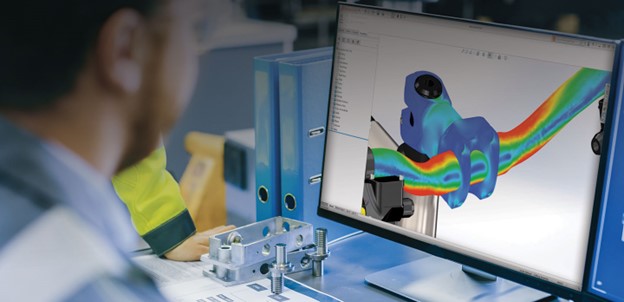
 

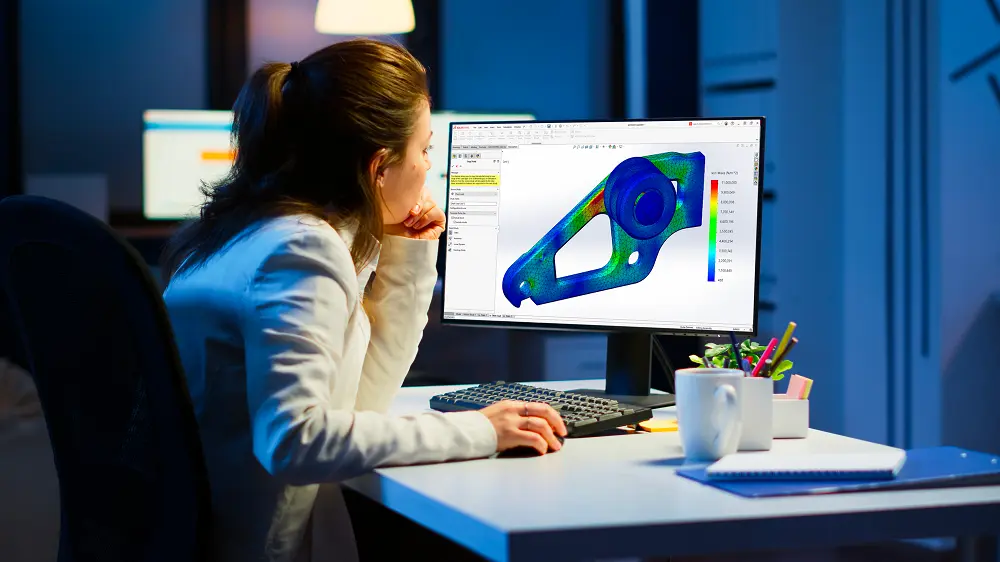
An engineer views a stress analysis on a computer screen, showcasing a 3D model of a mechanical part with color-coded stress distribution.


This blog explores the transformative enhancements in SOLIDWORKS 2025 Simulation, breaking down the key features and their practical applications. Whether you’re tackling large assemblies, complex geometries, or detailed fluid dynamics, these updates provide a powerful suite of tools to support every stage of the design process.


General Spring Connector: Simplified and Accurate Simulations

Simulation setups can be complex, but SOLIDWORKS 2025 introduces the General Spring Connector, which makes it easier to simulate spring interactions with more customization options than ever before.


What’s New

  • Custom Spring Properties: Define axial-only, isotropic, or orthotropic spring behaviors to suit your design needs.
  • Enhanced Compliance: Add custom compliance for greater control over how the spring behaves in different scenarios.


Why It Matters

Springs play a critical role in many mechanical systems, from suspension components to load-bearing structures. The General Spring Connector allows for more realistic simulations of spring behavior without requiring physical prototypes. For instance, engineers designing suspension systems can now test how springs react to various loads and stresses while accounting for unique material properties or configurations. By enabling greater precision in spring simulations, this feature saves time during setup and ensures your models reflect real-world performance.


Enhanced Pin Connector: Precision at Every Step

Connections between components are foundational to any assembly simulation. The improved Pin Connector in SOLIDWORKS 2025 refines this process, delivering better accuracy and performance for complex assemblies.


What’s New

  • Distributed Connection Type Improvements: Experience improved accuracy when using distributed connections.
  • Better Performance: Enjoy faster and more reliable simulations of pin-based connections, especially in large assemblies.


Why It Matters

Pin connectors are crucial for analyzing components like hinges, joints, or pivots. With the upgraded Pin Connector, engineers can confidently simulate these critical interactions while maintaining speed and accuracy. For example, in aerospace applications, where safety hinges on the integrity of pinned connections, these improvements provide deeper insights into load distribution and stress points.


Improved Handling of Large Models

Large assemblies often involve hundreds or thousands of components, making simulation setups a daunting task. SOLIDWORKS 2025 introduces tools to simplify and streamline these workflows.


What’s New

  • Exclude Non-Relevant Components: Quickly remove non-essential parts or bodies from simulations to declutter your workspace.
  • Focus on Selected Bodies: A new user interface option lets you isolate selected components for faster boundary condition setups.


Why It Matters

These enhancements allow you to focus on the components that matter most, reducing setup time and distractions. Imagine working on a complex machine assembly with hundreds of parts—these tools ensure you can isolate the gearbox, for example, without manually hiding or excluding other components. This targeted focus improves efficiency and helps maintain clarity throughout the simulation process.


Advanced Surface Interactions for Better Results

Accurate bonding between surfaces is essential for reliable simulations. SOLIDWORKS 2025 enhances both Node-to-Surface and Surface-to-Surface Bonded Interactions to improve accuracy and usability.


What’s New

  • Offset Bonded Interactions: Eliminate gaps between surfaces in mid-surface mesh studies for better results.
  • Improved Bonding for Complex Surfaces: Achieve more precise bonding on cylindrical, spherical, and conical surfaces for linear studies.


Why It Matters

Surface interactions often determine the success of a simulation. By improving bonded interaction accuracy, these upgrades ensure your models perform more like their real-world counterparts. Whether analyzing pressure vessels, complex geometries, or fatigue scenarios, you’ll experience faster, more reliable results with minimal setup adjustments.


SOLIDWORKS Plastics: Analyze Warpage with Precision

Warpage in plastic parts is a common issue that can lead to costly rework or manufacturing delays. SOLIDWORKS 2025 introduces advanced tools to pinpoint and address the causes of warpage.


What’s New

  • Break Down Warpage Causes: Analyze warpage by its sources, including unbalanced cooling, material orientation, and non-uniform shrinkage.


Why It Matters

This feature gives engineers greater control over the injection molding process, enabling faster corrections and better part quality. For example, if unbalanced cooling is the primary cause of warpage in a plastic enclosure, engineers can focus their efforts on redesigning the cooling channels, rather than adjusting other unrelated parameters.


SOLIDWORKS Flow Simulation: Speed and Accuracy Combined

Simulating fluid dynamics just became faster and more efficient. SOLIDWORKS 2025 includes performance and accuracy improvements for handling complex geometries and fluid flow challenges.


What’s New

  • Meshing for Faceted Geometries: Accelerate meshing for imported STL files and tessellated models.
  • Sink Mark Solver Upgrade: A new solver delivers higher accuracy for predicting sink marks in plastic parts.


Why It Matters

Flow simulations are vital for evaluating designs with fluid flow, such as cooling systems, HVAC components, or aerodynamics. These updates make it easier to handle complex shapes, reducing meshing time while maintaining accuracy. Engineers designing heat exchangers, for instance, can now spend more time optimizing performance rather than troubleshooting simulation issues.


Mesh Performance Upgrades

Meshing is a critical step in any simulation, and SOLIDWORKS 2025 improves performance for assemblies with repeated parts, such as bolts or gears.


What’s New

  • Faster Meshing for Repeated Parts: Improved handling of curved surfaces in large assemblies with many identical components.


Why It Matters

Large assemblies often include numerous repeating elements that can slow down meshing. This enhancement drastically cuts meshing time, allowing engineers to focus on analysis rather than setup. For example, an automotive engineer simulating an engine block with hundreds of bolts will see significant time savings during the meshing process.


Why Choose SOLIDWORKS 2025 for Simulation?

SOLIDWORKS 2025 Simulation offers a robust suite of upgrades that cater to engineers working on diverse projects.

Key Features

  • Time-Saving Features: From faster meshing to improved handling of large models, every feature is designed to streamline workflows.
  • Enhanced Accuracy: Precise bonding interactions, upgraded solvers, and advanced connectors ensure simulations reflect real-world conditions.
  • Improved Usability: A cleaner interface and targeted tools reduce complexity, allowing users to focus on engineering, not troubleshooting.

The Solidxperts Advantage

At Solidxperts, we’re committed to helping you unlock the full potential of SOLIDWORKS 2025 Simulation. Our expert team is ready to support you with training, implementation, and ongoing assistance, ensuring your workflows are optimized for success.
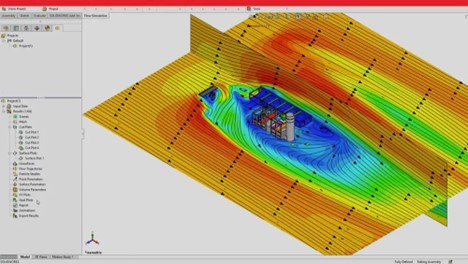
 

A SOLIDWORKS Flow Simulation interface displaying an aerodynamic study with colorful contour plots and vector arrows, indicating airflow over an object in a simulated


Ready to Dive Deeper?


Want to explore the list of simulation upgrades? Download the guide for detailed insights:


What’s New in SOLIDWORKS 2025 Simulation


Ready to take your designs to the next level? Contact Solidxperts today to schedule a demo and see how these tools can transform your engineering projects. Together, we’ll shape the future of design.

X_green_halo

Any questions? Need help? Ask one of our experts.

Whether you’re ready to get started or just have a few more questions, you can contact us toll-free:
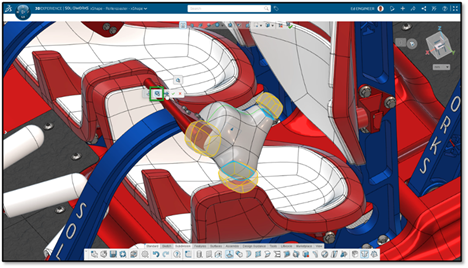
    What’s New in SOLIDWORKS 2025 Part 2: Browser-Based Roles

    BLOG

    What’s New in SOLIDWORKS 2025 Part 2: Browser-Based Roles

    [techtips_featured_image_shortcode]

    The latest updates to SOLIDWORKS browser-based roles for 2025 introduce transformative tools and workflows that redefine accessibility, efficiency, and collaboration in design. From bridging the gap between 2D and 3D design workflows to enabling proactive manufacturability checks, these updates empower designers and engineers to work smarter, not harder.


    Download the PDF


    Highlights include the innovative Picture to Sketch tool, which converts images into editable parametric sketches, and enhanced geometry alignment features for precision modeling. With advanced command search capabilities, streamlined sheet metal design tools, and built-in flexibility, SOLIDWORKS 2025 browser-based roles offer more powerful, accessible solutions for modern design challenges.


    Intro

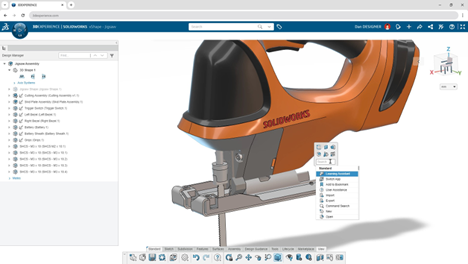
    SOLIDWORKS browser-based roles displaying a jigsaw assembly with command search functionality and design management tools on a browser interface.


    SOLIDWORKS continues to evolve, redefining how teams collaborate, create, and innovate. With the latest updates to SOLIDWORKS browser-based roles, designers and engineers gain new tools to unlock their creativity, streamline workflows, and bring their ideas to life—all from the flexibility of a browser.


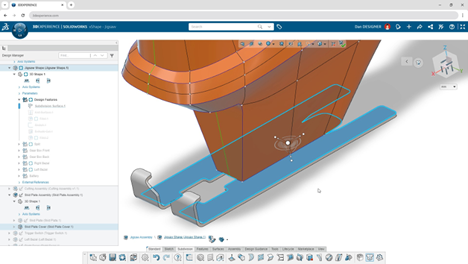
    Close-up view of a jigsaw model in SOLIDWORKS browser-based roles, highlighting subdivision surfaces and precise geometry editing tools.


    This blog continues our SOLIDWORKS 2025 What’ New series, delving into these updates, showcasing the most transformative features and how they elevate your CAD experience. Whether you’re enhancing manufacturability, accelerating workflows, or breaking down barriers between 2D and 3D design, these browser-based roles are the future of agile, accessible design.


    Breaking Down the Barriers: Unified Workflows for 2D and 3D Design

    The design process often toggles between 2D drawings and 3D models, creating potential inefficiencies. SOLIDWORKS browser-based roles eliminate this hurdle by offering a unified approach, giving you a single source of truth for your projects.

    What’s New

    • Versatile 2D and 3D Workflows: Add views, dimensions, and tolerances in a 2D environment while simultaneously generating 3D annotations for consistency.
    • Improved Accuracy: Automatically sync 2D and 3D data, ensuring all annotations and views align perfectly across platforms.

    Why It Matters

    This integration breaks the silos between 2D and 3D workflows, reducing errors and streamlining communication with stakeholders. Whether you’re designing components or documenting manufacturing instructions, this feature saves time while maintaining precision.


    Find Commands Faster: Command Search Enhancements

    Efficiency is critical in today’s fast-paced design environment. SOLIDWORKS browser-based roles make it easier than ever to locate the tools you need.

    What’s New

    • Intuitive Search: Search for commands by name, tooltip keywords, or synonyms directly from the S-key shortcut menu.
    • Accessibility: Quickly access commands—even if you’re unsure of the exact name—by using descriptive keywords.

    Why It Matters

    Navigating through countless menus is a thing of the past. This feature accelerates workflows, reduces frustration, and helps new users adapt to the software more quickly.


    From Concept to Creation: Picture to Sketch

    Have a hand-drawn concept or a reference image? SOLIDWORKS browser-based roles now enable you to transform ideas into actionable designs with the new Picture to Sketch tool.

    What’s New

    • Image Conversion: Seamlessly convert images into parametric 2D sketches for editing.
    • Migration Simplified: Trace 2D sketches from other CAD systems for smooth transitions into 3D CAD.
    • Creative Freedom: Use hand-drawn sketches or screenshots as a starting point to rapidly prototype ideas.

    Why It Matters

    This tool bridges the gap between imagination and execution, allowing designers to turn rough concepts into polished designs without starting from scratch.


    Ensuring Manufacturability with DFM Helper

    Design for Manufacturing (DFM) is a critical consideration for any product. With the DFM Helper, SOLIDWORKS browser-based roles provide proactive checks to optimize your designs for production.

    What’s New

    • Customizable Checks: Analyze parameters like part size, wall thickness, and hole specifications to identify potential manufacturing issues.
    • Error Prevention: Catch critical design flaws early, saving time and reducing costly manufacturing delays.

    Why It Matters

    By integrating manufacturability checks directly into the design process, DFM Helper ensures that your designs are production-ready from the start.


    Advanced Tools for Sheet Metal Design

    Sheet metal components are essential in many industries, and SOLIDWORKS browser-based roles enhance their design and documentation with powerful new features.

    What’s New

    • Closed-Corner Feature: Easily close gaps between flanges with customizable joint types (butt, overlap, underlap).
    • Bend Table Integration: Generate flat patterns with detailed bend information, including order, direction, radius, and more.

    Why It Matters:

    These tools streamline sheet metal design and improve communication with manufacturing teams, ensuring precise and efficient fabrication.


    Align, Modify, and Optimize: Expanded Geometry Tools

    Designing freeform shapes and modifying meshes is now faster and more intuitive, thanks to these geometry-focused updates.

    What’s New

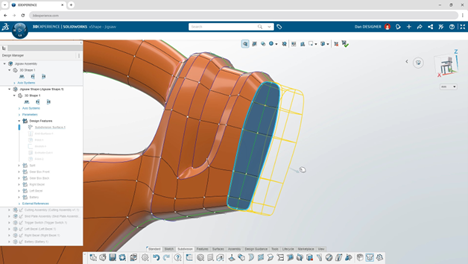
    • Align to External Geometry: Reference existing components during subdivision editing for accurate alignment of freeform designs.
    • Alternate Mesh Modifier Robot: Access mesh modification options directly from a new, intuitive interface.

    Why It Matters:

    These updates enhance precision and usability, giving designers greater control over complex geometries without interrupting their workflows.


    Why Choose SOLIDWORKS Browser-based roles?

    SOLIDWORKS browser-based roles redefine accessibility and collaboration, giving you the freedom to work on your designs from any device with a browser. This flexibility removes hardware constraints, making it easier than ever to stay productive.


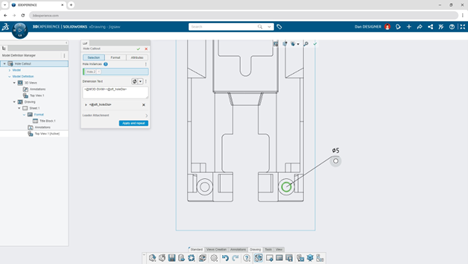
    SOLIDWORKS browser-based interface illustrating detailed 2D drawing annotations, including hole callouts and dimension management for a jigsaw model.


    With advanced features like Picture to Sketch and DFM Helper, you’ll save time, minimize errors, and streamline your workflows. Plus, integrated tools ensure consistency across teams and projects, enabling faster and more effective collaboration.


    Subdivision editing tools in SOLIDWORKS browser-based roles applied to the handle of a jigsaw model, demonstrating alignment to external geometry.


    Ready to Dive Deeper?

    Want to explore everything at once? Download the full guide here:


    What’s New in SOLIDWORKS Browser-Based Roles


    At Solidxperts, we’re here to help you get the most out of these innovative tools. Whether it’s onboarding or expert training, our team is dedicated to your success. Contact Solidxperts today to schedule a demo or learn how browser-based design can revolutionize your workflows.

    Let’s shape the future of design together.

    X_green_halo

    Any questions? Need help? Ask one of our experts.

    Whether you’re ready to get started or just have a few more questions, you can contact us toll-free:
      What’s New in SOLIDWORKS 2025 Part 1: Innovation at Every Turn

      BLOG

      What’s New in SOLIDWORKS 2025 Part 1: Innovation at Every Turn

      [techtips_featured_image_shortcode]

      SOLIDWORKS 2025 delivers an array of new features designed to enhance collaboration, streamline workflows, and elevate design precision. This latest release integrates advanced tools for real-time team connectivity, boosts performance for complex assemblies, and introduces smarter part modeling techniques. Users can also expect improvements in detailing, immersive rendering, and ECAD-MCAD collaboration, ensuring their projects meet the highest standards of efficiency and innovation.


      Download the PDF


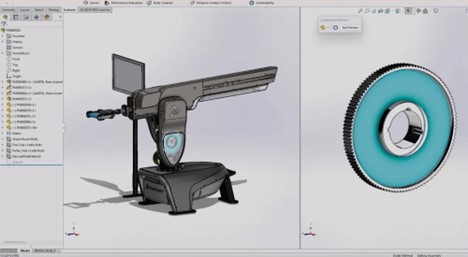
      A detailed 3D CAD model of the Proteus machine displayed in SOLIDWORKS software.


      With seamless integration into the 3DEXPERIENCE platform, SOLIDWORKS 2025 sets the stage for a new era of connected design and data management. Whether you’re optimizing workflows or exploring new creative possibilities, this release is tailored to help you achieve more in less time.


      Intro

      The wait is over—SOLIDWORKS 2025 is here, and it’s designed to push the boundaries of what’s possible in engineering and design. Packed with advanced tools and updates, this release focuses on enhancing collaboration, boosting performance, and delivering precision across every phase of the design-to-production journey.


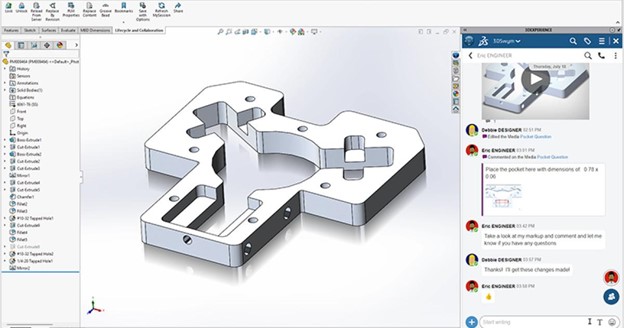
      A CAD drawing of a machined part within the SOLIDWORKS interface, featuring precise dimensions and cut-outs.


      At Solidxperts, we believe that staying ahead of industry trends means adopting tools that not only keep up but help you lead. With SOLIDWORKS 2025, you’ll find smarter workflows, new levels of connectivity, and features that empower you to take your ideas further.

      This blog marks the beginning of a multi-part series, where we’ll dive deeper into the newest features of SOLIDWORKS 2025 over the coming weeks. From part modeling to assembly performance, collaboration tools, and more, we’ll explore how these updates can elevate your projects and streamline your workflows.

      Let’s dive into the highlights of what’s new in SOLIDWORKS 2025.


      Collaboration Without Boundaries

      Innovation thrives in collaboration, and SOLIDWORKS 2025 takes team connectivity to new heights. With improved integration and real-time updates, your projects stay on track—even when your team is working remotely.


      What’s New

      • Instant Updates: Get real-time notifications on file changes, ensuring your team always works with the latest versions, preventing costly errors.
      • Connected Communities: Share insights, ask questions, and discuss designs directly within the platform—no more juggling external tools.
      • 3DEXPERIENCE PDM Integration: Leverage the power of SOLIDWORKS PDM combined with the 3DEXPERIENCE platform for robust data management and collaborative design.


      Why It Matters

      Collaboration tools in SOLIDWORKS 2025 streamline communication and ensure everyone, from engineers to stakeholders, stays on the same page. Say goodbye to wasted time and hello to connected productivity.


      Precision in Every Part

      Design is in the details, and the latest part modeling enhancements in SOLIDWORKS 2025 make achieving precision easier than ever. These updates are designed to reduce manual effort while expanding your creative possibilities.


      What’s New

      • Chamfer Command Accelerators: Select edges faster with intuitive accelerators that save time on repetitive tasks.
      • Variable Fillets: Create fluid, smooth transitions between edges with continuous blending capabilities.
      • Sheet Metal Efficiency: Automatically generate bend notches on flat patterns for quicker and more accurate manufacturing setups.
      • Silhouette Defeature: Simplify complex parts for large assemblies while keeping them linked to the original geometry.

      Why It Matters

      These tools allow you to focus on design innovation while minimizing repetitive tasks. The new modeling features ensure your designs are not only functional but also manufacturable, saving time and resources down the line.


      Assembly Performance Redefined

      When working with large assemblies, every second counts. SOLIDWORKS 2025 introduces performance improvements that help you manage complex designs with speed and precision.


      What’s New

      • Top-Level SpeedPak Configurations: Add SpeedPak configurations directly to the top level of assemblies without editing subassemblies.
      • Faster Mass Properties Calculations: Pre-calculated values for parts streamline mass property analyses in assemblies.
      • Interference Detection: Identify clashes between surface and solid bodies—even in Large Design Review mode.


      Why It Matters

      SOLIDWORKS 2025 empowers you to handle massive assemblies efficiently, helping you make decisions faster and maintain tight project timelines.


      Elevated Drawing and Detailing

      Great designs require clear documentation. With SOLIDWORKS 2025, creating and refining detailed drawings is faster and more intuitive, ensuring your team and partners can bring concepts to life seamlessly.


      What’s New

      • Multi-Approval Stamps: Enforce company rules and add approval stamps on connected devices for better control and accountability.
      • Custom BOM Quantities: Tailor BOM tables to display QUANTITY or LENGTH x QUANTITY based on your project needs.
      • Streamlined Layouts: Automatic placement of tables, dimensions, and annotations creates cleaner, more readable drawings.


      Why It Matters

      Time spent on creating, adjusting, and organizing drawings is now significantly reduced, allowing you to focus on delivering high-quality designs.


      A Visual Revolution with Immersive Rendering

      Captivating visuals are key to bringing your designs to life, and SOLIDWORKS 2025 is raising the bar with cutting-edge rendering features for Visualize.


      What’s New

      • Automated Rendering: Automate photorealistic renderings using the SOLIDWORKS Visualize API.
      • Vulkan API Ray Tracing: Leverage advanced GPU technology for real-time, interactive ray tracing that produces stunning visuals faster.


      Why It Matters

      These enhancements ensure you can present your designs with confidence, whether you’re pitching to stakeholders or showcasing ideas to customers.


      Bridging the Gap Between ECAD and MCAD

      For products that merge mechanical and electronic components, SOLIDWORKS 2025 introduces tools to ensure seamless integration between ECAD and MCAD workflows.


      What’s New

      • Detailed PCB Imports: Include internal and external copper features in PCB designs for accurate mass and thermal analyses.
      • CircuitWorks for All: Now universally available, CircuitWorks simplifies ECAD-MCAD collaboration.


      Why It Matters

      By bridging these traditionally siloed workflows, SOLIDWORKS 2025 enables teams to produce better designs in less time.


      Why Choose SOLIDWORKS 2025?

      SOLIDWORKS 2025 isn’t just an update; it’s a toolkit for success in a fast-paced, connected world. From collaborative tools to enhanced performance and precision, this version empowers you to deliver designs that stand out.


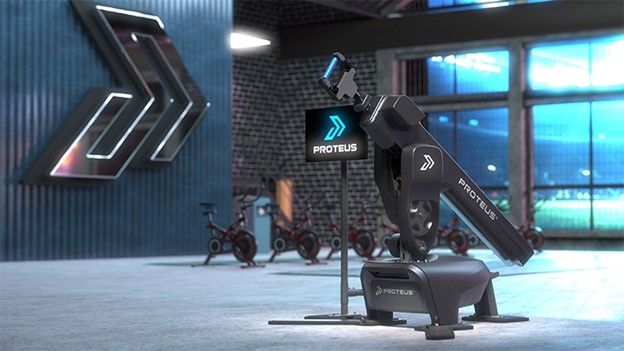
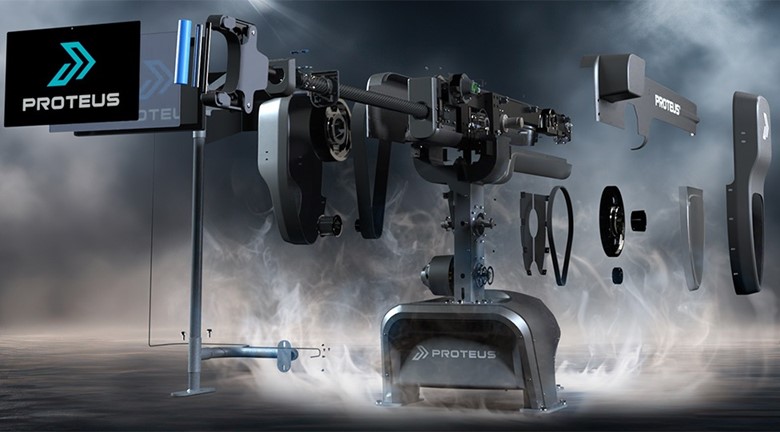
      An exploded view of the Proteus fitness machine, with individual components like the frame, belts, and electronics suspended in mid-air.


      At Solidxperts, we’re here to help you unlock the full potential of SOLIDWORKS 2025. Our team of experts is ready to guide you through its features, ensure a smooth transition, and provide ongoing support.


      Ready to Dive Deeper?

      For an in-depth look at these design, collaboration, and data management features and enhancements;


      Download the full PDF guide here

      X_green_halo

      Any questions? Need help? Ask one of our experts.

      Whether you’re ready to get started or just have a few more questions, you can contact us toll-free:
        What’s New in SOLIDWORKS Visualize 2025 and Visualize Boost

        BLOG

        What’s New in SOLIDWORKS Visualize 2025 and Visualize Boost

        [techtips_featured_image_shortcode]

        Abstract

        SOLIDWORKS Visualize 2025 introduces powerful new features to streamline rendering workflows and elevate the quality of photorealistic visuals. Highlights include Fast Render mode, AI and Vulkan Ray Tracing for real-time previews, and API integration for automated rendering processes. The new Faded Ground option enhances scene composition, while updates to Visualize Boost simplify distributed rendering for faster outputs. With the discontinuation of NVIDIA Iray, the Stellar engine takes center stage, offering improved performance and compatibility. These updates make SOLIDWORKS Visualize 2025 an indispensable tool for designers and engineers, enabling faster, smarter, and more efficient rendering.


        Introduction

        The ability to create stunning, photorealistic visuals is no longer a luxury—it’s a necessity. Whether you’re pitching concepts to clients, crafting marketing materials, or simply refining your designs, tools like SOLIDWORKS Visualize make it all possible. With the release of SOLIDWORKS Visualize 2025, Dassault Systèmes has raised the bar, introducing innovative features designed to accelerate workflows, enhance rendering quality, and improve overall user experience. From AI-powered rendering modes to streamlined distributed rendering with Visualize Boost, this latest version empowers designers and engineers to bring their ideas to life like never before.


        In this article, we’ll dive into the key enhancements of SOLIDWORKS Visualize 2025. Let’s explore what’s new and how these tools continue to lead in creating visually stunning content.


        Fast Render Mode

        One of the standout features in SOLIDWORKS Visualize 2025 is the new Fast Render mode. This mode utilizes Deep Learning artificial intelligence (AI) technology alongside advanced ray tracing to deliver real-time interactive rendering.


        Rendered scene of an industrial gym created in SOLIDWORKS Visualize 2025, featuring exercise equipment and a robotic display, with a user-friendly interface showcasing multiple camera angles.


        By rapidly eliminating noise from the viewport, Fast Render mode offers users a near-instantaneous preview of their designs, significantly accelerating the rendering process. This enhancement is particularly beneficial for users requiring quick iterations and approvals, as it reduces the time needed to produce high-quality images and animations.


        Photorealistic Rendering via SOLIDWORKS API

        Another significant advancement is the integration of Visualize with the SOLIDWORKS Application Programming Interface (API). This integration allows users to render SOLIDWORKS documents directly or convert them into Visualize project files through the Add-In. The API facilitates automation in the creation of photorealistic renderings, enabling a more efficient workflow and reducing manual intervention. This feature is particularly advantageous for users looking to automate repetitive tasks or integrate rendering capabilities into custom applications.


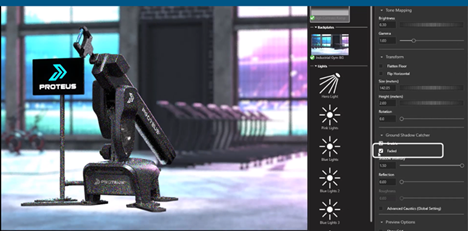
        Faded Ground Option

        SOLIDWORKS Visualize 2025 introduces a Faded Ground option, providing users with enhanced control over scene composition. By enabling the Faded setting under the Ground Shadow Catcher, the ground plane can be hidden without affecting the lighting and reflections on the model.


        Demonstration of the Faded Ground Shadow Catcher feature in SOLIDWORKS Visualize 2025, highlighting how ground reflections and lighting effects remain intact while the ground plane fades for a clean composition.


        This feature is especially useful for creating composite images, as it reduces the need for post-processing and allows for seamless integration of rendered models into various backgrounds.


        Enhancements in SOLIDWORKS Visualize Boost 2025

        Visualize Boost has been redesigned to offer a more intuitive setup and streamlined workflows. For those unfamiliar, SOLIDWORKS Visualize Boost is an add-on that enables distributed rendering across multiple machines, effectively lightening the load on a single computer and accelerating the rendering process. The 2025 update simplifies the configuration of rendering farms, making it easier to distribute rendering tasks and achieve faster results. This enhancement is particularly beneficial for users handling complex scenes or high-resolution outputs, as it allows for efficient utilization of networked resources.


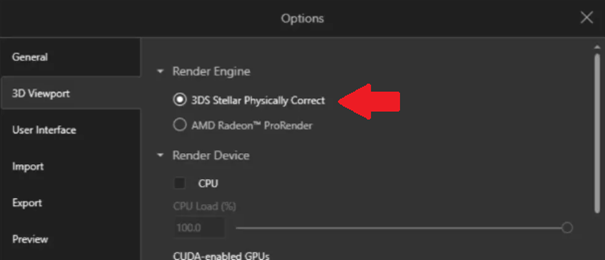
        Discontinuation of NVIDIA Iray Support

        With the 2025 release, SOLIDWORKS Visualize has discontinued support for the NVIDIA Iray rendering engine. The Stellar Physically Correct engine now serves as the default renderer.


        Screenshot of the SOLIDWORKS Visualize 2025 settings panel, showcasing the 3DS Stellar Physically Correct rendering engine as the default choice for superior rendering quality.


        Projects previously created with NVIDIA Iray will be automatically converted to the Stellar engine upon opening in SOLIDWORKS Visualize 2025. This transition ensures compatibility and takes advantage of the latest advancements in rendering technology, providing users with improved performance and quality.


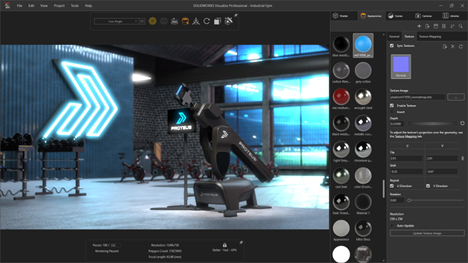
        Leveraging GPU Technology with Vulkan Ray Tracing API

        The Fast Render mode in SOLIDWORKS Visualize 2025 leverages the Vulkan Ray Tracing API, an open-standard API for 3D graphics and computing. This integration allows users to harness the power of modern GPUs, enabling real-time, interactive ray tracing.


        Interactive interface in SOLIDWORKS Visualize 2025 demonstrating advanced texture mapping capabilities, with a rendered robotic arm in an industrial gym setting and material customization options on the right panel.

        The result is a more responsive rendering experience, with accurate shadows and reflections, reducing the time required to achieve photorealistic results.


        Improved User Experience and Workflow Efficiency

        The 2025 release focuses on enhancing user experience by introducing features that streamline workflows and reduce manual effort. The integration with the SOLIDWORKS API allows for automation in rendering tasks, while the Faded Ground option minimizes the need for post-processing. Additionally, the intuitive setup of Visualize Boost facilitates the creation of rendering farms, enabling users to distribute workloads efficiently. These improvements contribute to a more efficient and user-friendly environment, allowing designers and engineers to focus on creativity and innovation.


        Why Choose SOLIDWORKS Visualize?

        SOLIDWORKS Visualize sets itself apart as a premier rendering tool by combining cutting-edge technology with user-friendly functionality.


        Real-Time Rendering with AI-Enhanced Speed

        The new Fast Render Mode leverages AI and Vulkan Ray Tracing technology to deliver real-time, noise-free previews. This revolutionary feature accelerates the rendering process, saving valuable time while ensuring the visual fidelity of your designs.


        Seamless Integration with the SOLIDWORKS Ecosystem

        As part of the SOLIDWORKS family, Visualize integrates smoothly with tools like SOLIDWORKS CAD and the 3DEXPERIENCE platform. This integration allows for effortless import of CAD models, direct manipulation of materials and textures, and streamlined data sharing across projects.


        User-Friendly Experience

        SOLIDWORKS Visualize is designed to accommodate users of all skill levels. Its intuitive interface makes it easy for beginners to produce professional-quality visuals, while advanced features empower seasoned users to refine and perfect their work.


        Scalable Performance with Visualize Boost

        With Visualize Boost, users can distribute rendering tasks across multiple computers for faster processing. This scalability ensures high performance even for complex projects, making it ideal for teams handling detailed models or high-resolution outputs.


        Key Use Cases for SOLIDWORKS Visualize

        Product Design and Marketing

        From concept sketches to final prototypes, SOLIDWORKS Visualize helps designers create lifelike representations of their products. These renderings are ideal for marketing materials, investor pitches, and design reviews, enabling stakeholders to visualize the end product with clarity.


        Automotive and Aerospace Industries

        Industries like automotive and aerospace require precise visualizations for engineering validation and customer presentations. The Faded Ground Option allows for seamless scene composition, while advanced lighting tools ensure accurate representations of materials and finishes.


        Architecture and Construction

        Architectural designers use SOLIDWORKS Visualize to create immersive visuals of buildings, interiors, and outdoor spaces. The realistic rendering capabilities help clients and stakeholders envision the final result, supporting faster approvals and better decision-making.


        Consumer Goods and Packaging

        For consumer goods, photorealistic renderings of products and packaging play a crucial role in branding and marketing. Features like material manipulation and scene customization enable companies to highlight product details and differentiate themselves in competitive markets.


        Conclusion

        SOLIDWORKS Visualize 2025 brings a host of enhancements aimed at improving rendering performance, flexibility, and integration. The introduction of Fast Render mode, integration with the SOLIDWORKS API, Faded Ground option, and improvements in Visualize Boost collectively contribute to a more efficient and powerful rendering toolset. These features enable users to produce high-quality, photorealistic renderings with greater speed and ease, supporting a wide range of applications from marketing materials to design reviews.

        To learn more about what SOLIDWORKS Visualize can do for your specific workflows, or to kick start your next 3D design journey, reach out to our SOLIDWORKS experts today!

        X_green_halo

        Any questions? Need help? Ask one of our experts.

        Whether you’re ready to get started or just have a few more questions, you can contact us toll-free:
          Designing for a Greener Future: Sustainability Tools in SOLIDWORKS

          BLOG

          Designing for a Greener Future: Sustainability Tools in SOLIDWORKS

          [techtips_featured_image_shortcode]

          In the age of environmental awareness, designing sustainable products has become a cornerstone of responsible engineering. From reducing waste to facilitating recycling and improving energy efficiency, the decisions made during the design phase significantly impact a product’s environmental footprint. SOLIDWORKS addresses these challenges with its robust Sustainability tools, enabling designers and engineers to integrate eco-conscious practices seamlessly into their workflows.


          This article explores some of the stand-out features of the SOLIDWORKS Sustainability toolkit, demonstrating how they empower users to design with sustainability in mind and contribute to a greener future.


          Why Does Sustainable Design Matter?

          Sustainable design focuses on minimizing the negative environmental impact of products throughout their lifecycle—from material selection to end-of-life disposal. It prioritizes resource efficiency, waste reduction, energy conservation, and recyclability.


          An industrial facility with a sustainable focus, featuring chimneys emitting green foliage and water droplets instead of smoke.


          Key Principles of Sustainable Design

          • Material Efficiency: Choosing eco-friendly, renewable, or recyclable materials.
          • Energy Efficiency: Reducing energy usage during manufacturing and product operation.
          • Waste Reduction: Designing products with minimal material waste during production.
          • End-of-Life Planning: Facilitating recycling, reusing, or repurposing of products.


          SOLIDWORKS Sustainability tools are built to help engineers and designers embed eco-conscious practices directly into their design workflows. They go beyond theoretical concepts, offering practical, data-driven features that turn sustainability goals into tangible design actions.


          Overview of SOLIDWORKS Sustainability Tools

          SOLIDWORKS offers two primary tools for sustainability analysis:


          • SustainabilityXpress: Integrated into the core SOLIDWORKS package, this tool provides a basic assessment of part documents, offering insights into the environmental impact of design choices.
          • SOLIDWORKS Sustainability: Available in SOLIDWORKS Premium and Ultimate editions, this advanced tool extends functionality to include assemblies, configuration-specific analyses, and comprehensive reporting.


          Get Actionable Insights

          SOLIDWORKS Sustainability tools provide real-time feedback on critical environmental metrics, such as carbon footprint, energy consumption, air acidification, and water eutrophication. This data gives designers a clear picture of how their material choices, manufacturing processes, and design modifications affect the environment.


          For example, a designer working on a product can immediately see how switching from virgin aluminum to recycled aluminum reduces the overall carbon footprint, helping them choose the most sustainable option without compromising performance.


          Empower Informed Decision-Making

          The integration of lifecycle assessment data ensures that you can consider the entire lifecycle of their product, from material sourcing and manufacturing to end-of-life disposal. This holistic view allows for smarter decisions that prioritize sustainability at every stage.


          Tools like Material Comparison and Find Similar Materials make it easy to identify eco-friendly alternatives to traditional materials, enabling users to strike a balance between environmental responsibility and engineering requirements.


          Stay Aligned with Established Design Principles

          By focusing on material efficiency, recyclability, energy conservation, and durability, these tools directly support key principles of sustainable design. They encourage practices like lightweighting (using topology optimization) and modular design (facilitating disassembly and repair), which reduce resource consumption and extend product lifespan.


          Experience Intuitive Usability and Integration

          SOLIDWORKS Sustainability tools are integrated into your familiar SOLIDWORKS environment, making assessments an intuitive part of your design process rather than a separate, time-consuming step. This seamless integration ensures that even small design teams can incorporate sustainability into their workflows without requiring extensive training or additional software.


          By providing immediate, meaningful feedback and enabling easy exploration of sustainable design alternatives, SOLIDWORKS Sustainability tools empower users to innovate while reducing environmental impacts, turning sustainable design from a lofty goal into an everyday reality.


          Key Features of SOLIDWORKS Sustainability

          : A silhouetted CAD engineer working on a tablet in a brightly lit design studio with large windows, plants, and eco-friendly design elements.


          Life Cycle Assessment (LCA) Integration

          At the heart of SOLIDWORKS Sustainability lies its ability to perform lifecycle assessments. This feature evaluates the environmental impact of a product from raw material extraction to disposal, enabling designers to consider every phase of the product’s existence.


          Key Metrics Assessed:

          • Carbon Footprint: Total greenhouse gas emissions.
          • Energy Consumption: Energy required during the product lifecycle.
          • Air Acidification: Impact of emissions contributing to acid rain.
          • Water Eutrophication: Nutrient pollution affecting water bodies.


          The LCA feature provides real-time feedback, empowering users to adjust their designs to minimize negative environmental effects.


          Material Selection and Analysis

          Material choice is critical in determining a product’s sustainability. SOLIDWORKS Sustainability integrates a robust material database, allowing users to evaluate the environmental performance of different materials.


          Features:

          • Material Comparison: Assess the environmental impact of materials based on criteria like recyclability, carbon footprint, and energy usage.
          • Find Similar Materials: Identify alternative materials with similar mechanical properties but lower environmental impact.
          • Eco-Friendly Materials: Explore options for recycled or renewable materials.


          Example: Switching from traditional plastic to a bioplastic alternative could significantly lower a product’s environmental footprint without sacrificing functionality.


          Environmental Impact Dashboard

          The Environmental Impact Dashboard provides real-time visualization of sustainability metrics. This interactive interface allows users to monitor the effects of their design choices and adjust parameters as needed.


          Benefits:

          • View metrics like carbon footprint and energy usage at a glance.
          • Experiment with design modifications to reduce environmental impact.
          • Generate detailed reports for presentations or compliance documentation.


          Example: A packaging engineer could use the dashboard to refine the shape of a container, reducing material waste while maintaining structural integrity.


          End-of-Life Analysis

          Designing with the product’s end-of-life in mind is essential for sustainability. SOLIDWORKS Sustainability helps users consider disassembly, recycling, and reusability options.


          Features:

          • Assess recyclability of materials used.
          • Simulate disassembly processes to identify areas for improvement.
          • Design modular components for easier upgrades or repairs.


          Example: A consumer electronics company can design a modular smartphone with replaceable components, ensuring longevity and easier recycling.


          Simulation for Optimization

          Efficient designs often require fewer resources and materials. SOLIDWORKS Simulation tools integrate seamlessly with Sustainability, helping you optimize your designs for minimal material usage and maximum durability.


          Features:

          • Topology Optimization: Reduce weight and material usage while maintaining strength.
          • Stress Analysis: Ensure durability without overengineering components.
          • Thermal and Flow Analysis: Optimize designs for energy efficiency in operation.


          Example: An automotive designer could use topology optimization to create lightweight vehicle parts, improving fuel efficiency and reducing emissions.


          Sustainability in a Circular Economy

          Sustainability doesn’t end with the product’s lifecycle—it extends into a circular economy, where materials are continuously reused and recycled. SOLIDWORKS Sustainability supports circular design principles with tools that enable:


          • Modular Design: Simplify repair and upgrades by creating replaceable modules.
          • Disassembly Simulation: Ensure products can be disassembled efficiently for recycling.
          • Lifecycle Evaluation: Optimize the entire lifecycle for minimal waste and energy use.


          Example: Designing appliances with easily replaceable parts ensures a longer product lifespan and less electronic waste.


          Business Benefits of Sustainable Design

          Adopting sustainable practices isn’t just good for the environment—it’s also a sound business strategy. Companies that integrate sustainability into their designs can:


          • Reduce Costs: Minimize material waste and energy usage during production.
          • Enhance Brand Reputation: Appeal to eco-conscious consumers and stakeholders.
          • Stay Ahead of Regulations: Meet or exceed environmental standards and certifications.
          • Drive Innovation: Explore new materials, processes, and design methodologies.


          Final Thoughts

          Designing for a greener future and balancing technological innovation with environmental protection often feel like trying to hit moving targets. But, SOLIDWORKS Sustainability tools empower engineers and designers to tackle environmental challenges head-on, to more efficiently deliver products that align with eco-friendly values. By leveraging features like lifecycle assessments, material analysis, and topology optimization, you can create innovative designs that minimize waste, conserve resources, and facilitate recycling.

          Ready to design for a greener future? Explore SOLIDWORKS Sustainability tools today and see how they can help you achieve your sustainability goals. Contact SolidXperts for expert guidance, training, and support to get started.

          Together, let’s build a more sustainable tomorrow!

          X_green_halo

          Any questions? Need help? Ask one of our experts.

          Whether you’re ready to get started or just have a few more questions, you can contact us toll-free:
            What’s New in SOLIDWORKS 2025? Redefining Design, Collaboration, and Data Management

            BLOG

            What’s New in SOLIDWORKS 2025? Redefining Design, Collaboration, and Data Management

            [techtips_featured_image_shortcode]

            Every year, SOLIDWORKS pushes the boundaries of innovation to meet the evolving needs of the design community. With SOLIDWORKS 2025, designers and engineers gain access to a robust set of tools that enhance collaboration, streamline workflows, and improve design accuracy. These updates aren’t just about incremental changes—they’re about transforming how you work, connect, and innovate.

            Let’s dive into what’s new and how these updates can elevate your design process.


            #1 Enhanced Collaboration and Data Management

            In today’s fast-paced design world, collaboration and efficient data management are key. SOLIDWORKS 2025 introduces new features to streamline teamwork and accelerate innovation.


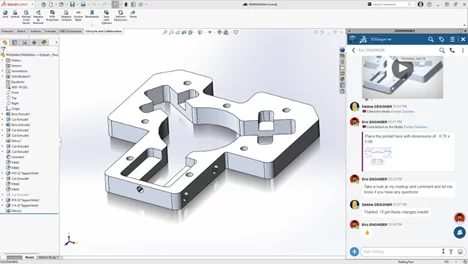
            Access to 3DSwym from the MySession Task Pane

            Easily connect with industry peers through SOLIDWORKS online communities in 3DSwym, now accessible directly from the MySession panel. This seamless integration enables real-time collaboration and knowledge sharing without leaving your design environment.


            SOLIDWORKS interface displaying a 3D CAD model of a machined part with detailed cutouts and holes. The 3DEXPERIENCE platform's collaborative chat panel is open on the right, showing a conversation discussing design feedback with annotated visuals.

            Real-Time Notifications

            Stay informed with real-time notifications that ensure you’re always working on the latest file versions. Whether you’re accessing files saved to the 3DEXPERIENCE platform or tracking updates made by collaborators, notifications alert you to changes and allow you to reload the latest data or review outdated components.


            Flexible Data Management Options

            A new feature in 3DEXPERIENCE SOLIDWORKS lets you save your data in SOLIDWORKS PDM or other systems, giving you the flexibility to use the data management solution that best suits your needs.


            #2 Advanced Part Modeling Flexibility

            SOLIDWORKS 2025 empowers you to design faster and more efficiently with new part modeling capabilities.


            Chamfer Selection Toolbar

            The Chamfer command now includes a Selection Toolbar to automate edge selections. With options like outer edges, inner edges, and edges along extrusions, you can significantly speed up your workflow by avoiding manual edge selection.


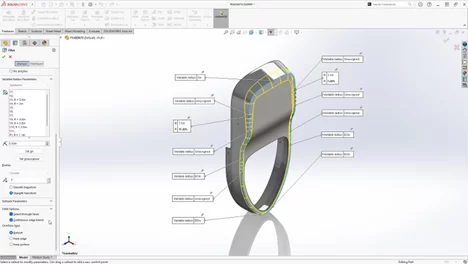
            Variable Fillet Chain

            Achieve smoother transitions with the new Continuous Edge Blend option for variable fillets, enabling seamless blends across complex geometries.


            SOLIDWORKS interface showcasing a 3D model with a highlighted variable fillet feature applied to the edges. The variable radius parameters are displayed with annotations alongside the feature's settings panel on the left.


            Sheet Metal Bend Notch

            Sheet metal design sees a boost with the ability to add customizable bend notches directly on the flat pattern bend lines. This enhancement improves manufacturability and simplifies the design-to-production process.


            #3 Boosted Performance

            Performance enhancements in SOLIDWORKS 2025 are designed to save you time, especially when working with large assemblies.


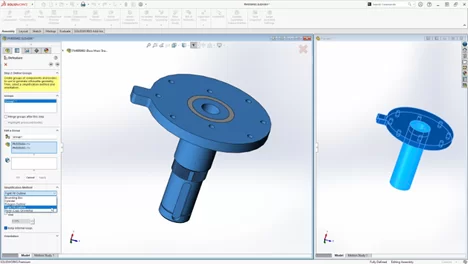
            Silhouette Defeature Method

            Simplify parts for faster processing while maintaining associations with the parent part using the Silhouette Defeature Method.


            SOLIDWORKS interface displaying a simplified assembly using the Silhouette Defeature tool. The model is divided into grouped components with simplified outlines on the left panel, while the right panel shows the resulting lightweight representation.


            SpeedPak Configuration at Assembly Level

            Create SpeedPak configurations at the top assembly level without modifying subassemblies, offering more flexibility in simplifying large designs.


            Faster Assembly Mass Calculations

            Previously calculated mass properties for parts and bodies are reused to speed up mass property calculations for assemblies, saving valuable time.


            #4 Accelerated Assembly Modeling

            SOLIDWORKS 2025 brings new features to improve assembly design and manufacturability.


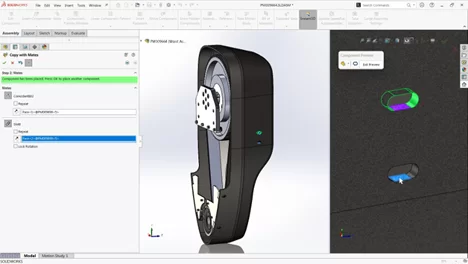
            Copy Assembly Components with Mates

            Preserve design intent while accelerating assembly creation by copying components along with their advanced and mechanical mates.


            Surface Body Interference Detection

            Interference checks now support surfaces, allowing you to detect issues between solid parts and surface bodies or between multiple surfaces, making it easier to validate imported geometry.


            Interference Detection in Large Design Review Mode

            Speed up interference checks in Large Design Review Mode (LDR), allowing you to work more efficiently with large assemblies.


            A detailed assembly with a section view of a mechanical component. The left panel highlights the 'Copy with Mates' tool in use. The right panel displays a preview of the selected component.


            #5 Improved Detailing of Drawings

            Drawing enhancements in SOLIDWORKS 2025 focus on reducing manual work and enforcing company standards.


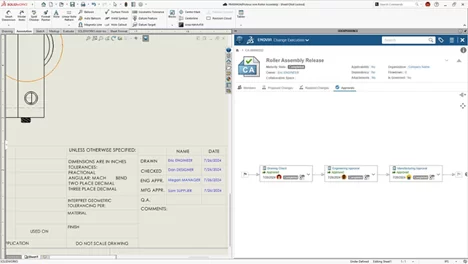
            Multi-Approval Stamps

            Streamline the drawing approval process with multi-level approval stamps. Tasks and notifications can now be assigned for review, with automatic time stamps showing approval status directly on the drawing.


            The SOLIDWORKS interface displaying an engineering drawing detailing dimensions, tolerances, and approvals. The 3DEXPERIENCE panel on the right showcases the ENOVIA Change Execution process, outlining the approval workflow stages.


            BOM Quantity Override for Detailed Cut Lists

            Gain flexibility in how quantities are displayed in the BOM table. Structural member quantities can now be shown as QUANTITY or LENGTH x QUANTITY, offering more detailed insights.


            #6 Flexible 3D Dimensioning and Tolerancing

            Eliminate the need for disconnected 2D drawings with enhanced 3D dimensioning and tolerancing capabilities.


            DimXpert Dimensions from Sketches

            Automatically define model-based dimensions using intelligence built into sketches, speeding up the creation of fully defined models.


            Drafted Feature Dimensions

            Document drafted features more easily with the new DimXpert capabilities.


            STEP 242 Export Controls

            Communicate PMI data more effectively downstream with improved STEP 242 export options, offering greater flexibility and control.


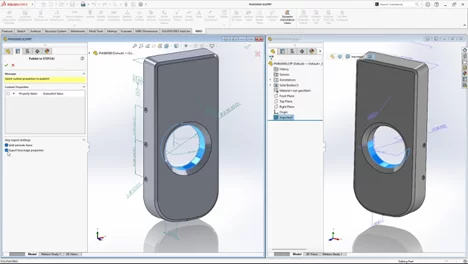
            A part file in two views. The left panel features export settings for publishing to STEP242 format, highlighting options like 'Split by surface faces' and 'Export face/edge properties.' The right panel shows the part's geometry with annotations and reference dimensions.


            #7 Improved Harness Board Drawings

            Accelerate the creation of manufacturing documentation with the ability to create improved harness board drawings.


            Improved Organization

            Improve the organization and positioning of tables and balloons on flattened drawings with refined auto-placement of tables, dimensions, balloons, and formats.


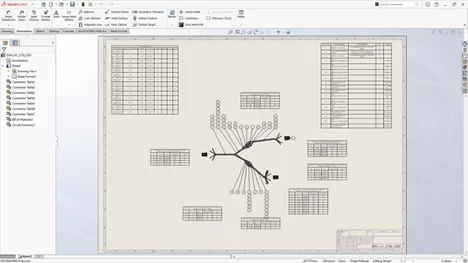
            An electrical schematic drawing with connector tables, a bill of materials, and circuit summaries. The detailed layout includes a central wiring diagram, branching connections, and labeled tables providing precise electrical and component data for assembly.


            Auto Placement

            Speed up harness board creation with auto placement of tables, balloons and more.


            Automatic Updates

            Automatically update the electrical harness documentation after design changes.


            #8 Streamlined ECAD/MCAD Collaboration

            SOLIDWORKS 2025 makes it easier than ever to collaborate on electrical and mechanical designs.


            Expanded CircuitWorks Capabilities

            Now available to all SOLIDWORKS users, CircuitWorks allows you to import internal and external copper features like traces and vias using IDX files. Accessing copper geometry directly in SOLIDWORKS improves accuracy for thermal, structural, and electromagnetic analyses.


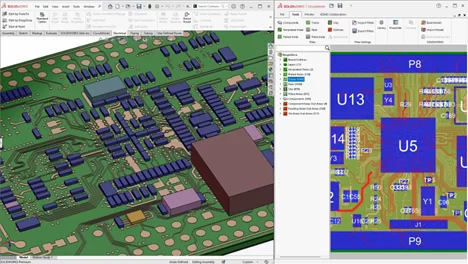
            A detailed 3D PCB assembly showcasing components, traces, and vias. The right panel displays a zoomed-in 2D view of the PCB layout, highlighting electrical connections, components, and routing paths with color-coded layers.


            #9 Immersive Rendering Benefits

            Take advantage of real-time, interactive ray tracing with the latest GPU advancements for rendering.


            Visualize Photorealistic Rendering via API

            Automate rendering workflows using SOLIDWORKS Visualize and the SOLIDWORKS API, enabling photorealistic renderings with minimal effort.


            Fast Mode Rendering with DSPBR Engine

            Experience real-time rendering with Dassault Systèmes’ Physically Based Rendering (DSPBR) engine, leveraging the Vulkan API for unmatched visual performance.


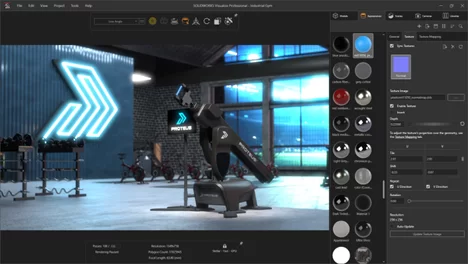
            SOLIDWORKS Visualize Professional showing a rendered scene of the Proteus machine in an industrial gym setting.


            #10 User Experience Enhancements

            Sometimes, it’s the small changes that make the biggest difference. SOLIDWORKS 2025 introduces usability improvements to boost productivity:


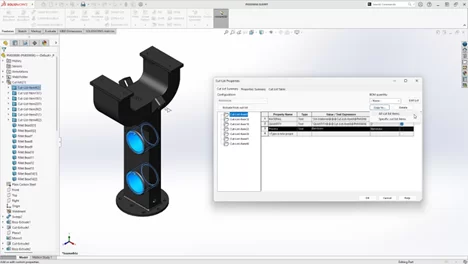
            The SOLIDWORKS interface showcasing a structural part with a detailed cut list table open.


            • Reattach Broken Sketch Relations: Quickly resolve issues caused by missing references in sketches.
            • Copy Cut List Properties: Simplify workflows by copying cut list properties across specific items or entire models.
            • Improved Selection Breadcrumbs: Navigate complex assemblies faster with clearer selection hierarchies in LDR mode.

            The Value of Cloud-Based Solutions

            Both SOLIDWORKS PDM and the 3DEXPERIENCE platform offer cloud-based options, enabling remote teams to collaborate seamlessly. By supporting mobile access and reducing the need for physical servers, cloud integration enhances team members’ ability to access the most current design data.


            Comparing Costs

            For smaller organizations, SOLIDWORKS PDM is a cost-effective solution, offering basic data management features that integrate with SOLIDWORKS. PLM requires a higher initial investment but pays off with lifecycle management of product data across departments, improving long-term productivity.


            Wrapping Up: Choosing the Right Solution

            Choosing between SOLIDWORKS PDM vs. PLM on the 3DEXPERIENCE platform depends on your organization’s specific needs. For CAD-centric teams, PDM provides a robust data management system. For teams needing product lifecycle management solutions that encompass every phase of the product development process, the 3DEXPERIENCE platform is an ideal solution.


            Ready to Get Started?

            SOLIDWORKS 2025 is packed with tools and enhancements to make your design process faster, smarter, and more collaborative. For a quick reference, download the enhancement flyer here and explore more demo videos on the official SOLIDWORKS webpage.

            Don’t wait—get ready to elevate your designs with SOLIDWORKS 2025!

            X_green_halo

            Any questions? Need help? Ask one of our experts.

            Whether you’re ready to get started or just have a few more questions, you can contact us toll-free:
              SOLIDWORKS PDM vs. PLM on the 3DEXPERIENCE Platform

              BLOG

              SOLIDWORKS PDM vs. PLM on the 3DEXPERIENCE Platform

              [techtips_featured_image_shortcode]

              While Product Data Management (PDM) and Product Lifecycle Management (PLM) may sound similar, they serve different roles within the design journey. PDM focuses on managing and securing CAD files, making it easier for design teams to stay organized. PLM, on the other hand, supports full lifecycle management from concept through to production, bringing together departments like engineering, marketing, and manufacturing within a unified, cloud-based environment.

              In this article, we’ll explore SOLIDWORKS PDM vs. PLM on the 3DEXPERIENCE platform and how each addresses specific needs, from basic data management tools to a comprehensive framework for collaborative project management. By understanding the capabilities of each, your team can make an informed decision on which solution is the best fit.


              What Are PDM and PLM?

              Product Data Management and Product Lifecycle Management systems both offer essential solutions for organizing and managing information, but they serve different purposes within the product lifecycle. PDM focuses primarily on managing CAD files, while PLM provides a more comprehensive approach, supporting the full lifecycle management of products from initial design to production all the way through retirement. Let’s break down how these systems differ and how each benefits product design and engineering teams.


              Benefits for Data Control

              SOLIDWORKS PDM is an ideal solution for CAD environments. It provides a secure place to store files, ensuring safe concurrent designs among team members. Through features like version control, file locking, and workflows, you can maintain consistency across projects, making it a good choice for CAD-heavy teams that need to stay organized.


              How Does PLM Differ From PDM?

              While PDM is designed to manage CAD files and engineering information, PLM systems expand beyond the design department. PLM solutions, especially on the 3DEXPERIENCE platform, cover the product lifecycle management needs of various departments, supporting collaboration among project managers, marketing, manufacturing, and sales. With PLM, teams can track key milestones, dependencies, and delivery dates, ensuring everyone in the organization has visibility into the project planner.


              Can They Be Used Together?

              Absolutely, both system types can be complementary. Many organizations use SOLIDWORKS PDM for managing CAD-heavy data and PLM for broader lifecycle management of product data. This combination is especially valuable in complex projects where design data must seamlessly transition into the manufacturing process.


              SOLIDWORKS PDM vs. PLM on the 3DEXPERIENCE Platform: Which One Should You Choose?

              The choice between SOLIDWORKS PDM vs. PLM on the 3DEXPERIENCE platform depends on your organization’s needs. PDM is ideal for managing CAD files and design data among users who rely on SOLIDWORKS PDM Professional. On the other hand, PLM supports the lifecycle management of product data and is a better fit for organizations requiring a data management system that integrates every department involved in the manufacturing process.


              Licensing Options

              SOLIDWORKS PDM offers licensing based on the SOLIDWORKS subscription service model, which works well for smaller teams that need essential data management capabilities. The 3DEXPERIENCE platform provides scalable options, suitable for larger teams requiring collaboration across multiple roles, including project managers, engineers, and even remote teams.

              Feeling a little lost? We totally get it. But, fear not! We’re here to help, every step of the way. Reach out to our dedicated teams to know more, or to get personalized advice on how to implement your ideal data management solutions!


              PDM on the 3DEXPERIENCE Platform

              For SOLIDWORKS users who want to stay within a familiar environment, PDM on the 3DEXPERIENCE platform is a logical step. It supports file organization within a secure place, with version control and flexible workflows for enhanced collaboration. Accessible through a web browser, this setup allows for real-time interactions among team members, ensuring everyone works on the latest data.


              Enhancing Collaboration Beyond Design

              The 3DEXPERIENCE platform goes beyond traditional product data management by providing a collaborative data environment. With tools like the Collaborative Industry Innovator and Collaborative Business Innovator role, the platform enables teams to connect across departments. This environment fosters a collaborative experience for project managers, product release engineers, and team leaders alike, providing visibility into all aspects of the product development process.


              Key Advantages of 3DEXPERIENCE for Product Design Teams

              The 3DEXPERIENCE platform offers cloud-based data management tools that allow for real-time collaboration across team members. With dashboards for project tracking, workflows for approvals, and flexible server access, teams can work together efficiently, regardless of location.


              Why Consider Switching to PLM on the 3DEXPERIENCE Platform?

              Switching to the 3DEXPERIENCE platform can improve collaboration by creating an interconnected environment for product lifecycle management. This platform enhances the flow of collaborative data and integrates tools such as the Project Planner and Collaborative Industry Innovator, offering best practices for organizations looking to improve delivery dates and enhance visibility into projects.


              SOLIDWORKS PDM vs. PLM on 3DEXPERIENCE for Different Industries

              SOLIDWORKS PDM is particularly well-suited for small-to-medium engineering teams that prioritize CAD-focused file management, version control, and workflow automation within a secure environment. It enables these teams to streamline design processes and collaborate effectively on CAD data.

              On the other hand, PLM on the 3DEXPERIENCE platform extends beyond CAD data management, offering a comprehensive solution for industries like automotive and aerospace where complex project requirements demand robust collaboration and visibility across all departments.


              Does PLM Improve Product Lifecycle Traceability?

              Yes, PLM significantly enhances product lifecycle traceability by providing a centralized platform that connects all stages, from initial design through to production and beyond. Teams can monitor key milestones, dependencies, and revisions, enabling complete visibility over the product’s evolution. This comprehensive tracking helps stakeholders stay aligned on project goals, maintain version control, and ensure timely decisions. For industries with stringent regulatory requirements, PLM is invaluable as it consolidates compliance data, audit trails, and documentation, making it easier to meet standards and demonstrate accountability throughout the product lifecycle.


              What Role Does SOLIDWORKS or CATIA Play?

              Both SOLIDWORKS and CATIA play essential roles within Product Lifecycle Management by supporting detailed design and engineering processes. CATIA, as a core application on the 3DEXPERIENCE platform, is especially suited for industries like aerospace and automotive, where complex 3D modeling and simulation capabilities are critical.

              Meanwhile, SOLIDWORKS offers intuitive design tools that, when connected with PLM, empower teams to efficiently organize, share, and evolve their designs in line with project goals and regulatory requirements. Both solutions enrich your lifecycle environment by enhancing visibility and traceability throughout product development.

              For more information on CATIA or to get started on your next advanced engineering project, check out our sister-brand, Mecanica!

              The Value of Cloud-Based Solutions

              Both SOLIDWORKS PDM and the 3DEXPERIENCE platform offer cloud-based options, enabling remote teams to collaborate seamlessly. By supporting mobile access and reducing the need for physical servers, cloud integration enhances team members’ ability to access the most current design data.


              Comparing Costs

              For smaller organizations, SOLIDWORKS PDM is a cost-effective solution, offering basic data management features that integrate with SOLIDWORKS. PLM requires a higher initial investment but pays off with lifecycle management of product data across departments, improving long-term productivity.


              Wrapping Up: Choosing the Right Solution

              Choosing between SOLIDWORKS PDM vs. PLM on the 3DEXPERIENCE platform depends on your organization’s specific needs. For CAD-centric teams, PDM provides a robust data management system. For teams needing product lifecycle management solutions that encompass every phase of the product development process, the 3DEXPERIENCE platform is an ideal solution.

              X_green_halo

              Any questions? Need help? Ask one of our experts.

              Whether you’re ready to get started or just have a few more questions, you can contact us toll-free:
                Spooky SOLIDWORKS Design Fails: How to Avoid CAD Nightmares

                BLOG

                Spooky SOLIDWORKS Design Fails: How to Avoid CAD Nightmares

                Whether you’re a beginner just learning the ropes or an experienced CAD designer with years of projects under your belt, SOLIDWORKS design fails can strike unexpectedly and cause more than just frustration—they can derail timelines, increase costs, and even impact client trust. From disorganized file management to unexpected software crashes, the world of CAD is filled with potential pitfalls that can turn a straightforward project into an engineering nightmare.

                In this blog, we’ll dive into some of the most common SOLIDWORKS design fails that haunt CAD workflows and explore practical ways to avoid these pitfalls.


                SOLIDWORKS Design Fails to Watch Out For

                For CAD beginners, navigating SOLIDWORKS can feel like walking through a haunted house. One wrong step, and you’re in trouble. Over-complicating sketches, misusing fillets, or misunderstanding constraints all cause frustrating errors. For example, adding too many constraints can make a sketch over-defined, leading to geometry errors and regeneration problems.

                Avoiding Beginner Pitfalls: Start with simple sketches and gradually increase complexity. Avoid excessive constraints and verify each step as you build your design. When using features like fillets, apply them strategically to avoid performance issues while maintaining smooth geometry.


                SOLIDWORKS and the Ghost of Overlooked Updates

                Ignoring software updates is a common mistake that can come back to haunt CAD designers. Outdated software can lead to compatibility issues, errors, and missed opportunities for performance improvements. Over time, this can turn even simple tasks into a struggle.

                Keep Your Software Current: Keep your SOLIDWORKS up-to-date and install updates promptly. Staying up to date will help you avoid compatibility problems, benefit from new features, and maintain optimal performance. Looking to update? Check out SOLIDWORKS 2025!


                Common CAD Modeling Mistakes and How to Avoid Them

                What are some common CAD modeling mistakes that haunt both beginners and experienced designers? One of the most frequent issues is creating overly detailed models. While it may seem beneficial to add intricate details, excessive features can slow down CAD software and lead to errors. For instance, intricate sketch features can result in longer regeneration times and problems with assemblies.

                How to Avoid These Mistakes: Focus on creating simplified geometry and adding details only as needed. Keep sketches clean and organized, with fewer entities and constraints. Avoid adding redundant features that can complicate the model. Use the built-in CAD tools to check the quality of your model and resolve problems before they escalate.


                Haunted Geometry: Why Complexity Can Be a Design Killer

                In CAD systems, more geometry isn’t always better. Complex shapes and intricate details may look impressive, but they can cause significant issues, especially in large assemblies. For example, creating models with too many small features or tight tolerances can slow down system performance and lead to unexpected crashes.

                Taming the Complexity: To avoid performance problems, simplify your model whenever possible. Break complex shapes into manageable features and avoid creating unnecessary small faces or edges. When dealing with assemblies, switch between simplified and detailed configurations as needed to balance performance and visual detail.


                Are You Using Sketches Correctly?

                Incorrectly constructed sketches are one of the common mistakes that can lead to SOLIDWORKS design fails. Overly complicated sketches with many entities and constraints can slow down performance and make modifications difficult. If a sketch is too complex, even small changes can result in significant errors.

                Tips for Proper Sketching: Keep sketches simple and avoid unnecessary constraints. When making design changes, a clean, organized sketch will be easier to update. Use tools like “Check Sketch for Feature” to identify and correct potential issues before moving forward with your design.


                Phantom Files: Disorganized File Management

                Disorganized file management is one of the biggest headaches CAD designers have deal with. Phantom files—those lost or misplaced due to poor organization—can delay projects and disrupt the workflow. When file naming conventions aren’t followed, or folders are poorly structured, important files can go missing, just like a phantom that haunts your project. We’re all guilty of it, but naming files with vague terms like “final” or “final_v2” makes it hard to identify the correct version.

                How to Avoid This Curse: Implement consistent file naming conventions and a logical folder structure from the beginning. Use SOLIDWORKS PDM (Product Data Management) to keep all files organized and easily accessible in a central repository. PDM can help track file versions, automate version control, and allow metadata searches to prevent phantom files from disrupting your workflow.


                The Curse of Version Control: Disastrous Overwrites

                When team members unknowingly work on different versions of the same file, it’s a recipe for disaster. Without a structured approach, conflicting updates or lost data can occur—turning a simple project into an engineering nightmare.

                How to Avoid This Version Control Curse: Implement version control tools like SOLIDWORKS PDM and the 3DEXPERIENCE platform. They’ll allow you to track changes, maintain a complete version history, and merge updates seamlessly. Locking files while they are being edited prevents others from making conflicting changes, keeping everyone aligned and the workflow smooth.


                SOLIDWORKS and the Mystery in the Machine

                Software failures always happen at the most inconvenient times. Whether it’s a sudden crash, freeze, or unexpected glitch, these errors can result in lost work and frustration. The mystery lies in the unpredictability of these failures—sometimes a large assembly crashes due to low system memory, while other times, a rendering process fails without warning.

                How to Mitigate These Risks: Ensure regular software updates and perform consistent backups. Enabling SOLIDWORKS’ auto-recovery feature can help recover work lost during a crash. Additionally, for large projects, consider breaking up assemblies into subassemblies to reduce system strain and optimize performance.


                How to Fix a SOLIDWORKS Design Error For Beginners

                Errors like geometry failures, broken references, or missing files can derail progress and cause serious delays. For instance, importing a third-party file may lead to misaligned faces or gaps in the geometry, resulting in annoying issues.

                How to Avoid These Errors: Stay proactive by regularly checking for software updates and enabling auto-recovery options in SOLIDWORKS. Keeping backups of your work ensures you can revert to a previous state if an error occurs. Use tools like “Repair Sketch” or “Check Entity” to promptly identify and resolve geometry issues and avoid these problems.


                Don’t Let Time-Consuming Design Changes Haunt You

                In CAD design, one change can lead to a cascade of time-consuming modifications. Without a flexible design approach, adapting to new requirements can be difficult and costly. For example, rigid design practices can make client-requested changes disruptive and slow.

                Plan for Flexibility: Use parametric modeling techniques to make your design easily adaptable. Organize your sketches and features well, anticipating future changes. By planning for flexibility, you can avoid wasting time on rework and keep spooky design problems at bay.


                The Power of CAD Systems

                CAD systems are powerful tools, but they can become overwhelming when not used correctly. Poor workflow practices can lead to inefficiencies and errors that haunt CAD designers.

                Optimizing Your CAD Workflow: Plan your workflow carefully, choosing the appropriate tools for each design stage. Make the most of features like patterning and reference geometry to streamline the design process. The goal is to reduce the time spent on repetitive tasks while ensuring high-quality results.


                A Final Word on Avoiding SOLIDWORKS Design Fails

                Avoiding SOLIDWORKS design fails requires a proactive approach. Taking steps to optimize your workflow, manage files efficiently, and stay updated with the latest software versions will help keep engineering nightmares at bay. Remember, preparation and best practices are the keys to successful CAD design.

                Want to explore more CAD tips, tricks, and techniques? Ready to take your SOLIDWORKS skill to the next level?

                Browse through our library of SOLIDWORKS-based blogs, or sign up for your next Solidxperts Academy course. Check out our upcoming trainings, here.

                X_green_halo

                Any questions? Need help? Ask one of our experts.

                Whether you’re ready to get started or just have a few more questions, you can contact us toll-free:
                  Simplifying Data Management in Modern Manufacturing Industry

                  BLOG

                  Simplifying Data Management in Modern Manufacturing Industry

                  Proper data management in modern manufacturing is no longer just a support function; it’s a pivotal role helping companies operate efficiently and stay competitive. The sheer volume and variety of data generated—from production processes to supplier information—demand a strategic approach to managing, storing, and analyzing information. Effective data management strategies enable manufacturers to improve product quality, streamline workflows, and optimize supply chain operations, all while meeting strict regulatory requirements.

                  However, without a robust management framework, companies risk facing significant challenges. Disorganized or outdated information can lead to miscommunication, production delays, and cost inefficiencies, ultimately hampering growth and innovation. By implementing a solution like SOLIDWORKS PDM, manufacturers can drive operational efficiency and embrace new opportunities in an increasingly digital world.


                  Why Is Data Management Critical in Modern Manufacturing?

                  Purposeful data management is crucial in modern manufacturing for accuracy, efficiency, and agility. Real-time information enables proactive problem-solving, reducing supply chain disruptions and ensuring product quality. Robust management prevents miscommunication, delays, and increased costs from information silos and poor integration.


                  Consequences of Poor Data Management

                  Setbacks happen when information is not properly organized or updated. Miscommunication, delayed production timelines, and uncoordinated responses to supply chain disruptions not only impact operational efficiency but also hinder your companies’ ability to maintain consistency and visibility throughout your processes. A well-defined strategy can help mitigate these risks.


                  SOLIDWORKS PDM: Enhancing Data Management in Modern Manufacturing

                  SOLIDWORKS PDM simplifies data management in modern manufacturing by providing a centralized solution for organizing, storing, and sharing. It enhances information quality and helps maintain version control, ensuring information accuracy, and automating workflows. This centralized approach addresses the challenge of disparate information sources, streamlining collection across departments and stakeholders, while also securing sensitive information against potential cyber threats.


                  Optimizing Manufacturing Operations with Data Analytics

                  Data analytics has transformed how companies achieve operational efficiency and operational excellence. With SOLIDWORKS PDM, companies can harness analytics to gain insights from sources across your IoT devices and sensors, enhancing visibility into production processes. This enables the application of predictive analytics and machine learning algorithms for process optimization and risk mitigation.


                  Breaking Down Information Silos for Enhanced Transparency

                  Information silos create barriers to information flow, resulting in fragmented data and missed opportunities for growth. Good PDM practices help eliminate silos by integrating information sources across departments, creating a transparent information environment where teams can access information seamlessly. This interoperability is crucial for supporting digital transformation journeys and fostering collaboration across the organization.


                  IoT and Sensors for Real-Time Data Collection

                  The integration of IoT and sensors in manufacturing allows for real-time insights that enhance product quality. Imagine having eyes on everything, with full visibility just a few clicks away. By connecting IoT devices to your PDM systems, you can monitor manufacturing operations more closely, respond quickly to changes, and avoid bottlenecks. SOLIDWORKS PDM supports this integration, offering a reliable foundation for storage and analytics.


                  Improving Data Management Strategies

                  To build effective data management in modern manufacturing, companies should implement foundational best practices that support clarity and efficiency. Establishing clear standards for file organization helps ensure that critical information, from supplier details to product development resources, is easy to locate and consistently maintained. Regular team training reinforces these standards, equipping employees with the skills to navigate and utilize systems confidently, fostering greater accuracy and efficiency across departments. Taking a proactive approach to governance further enhances these efforts by setting guidelines that prevent issues before they arise. SOLIDWORKS PDM acts as a catalyst in this process, integrating these practices into a cohesive system that centralizes and secures all relevant resources, enabling smoother workflows and more reliable information management.


                  Metadata Management

                  Metadata management is essential for maintaining consistency and accuracy across all assets. With SOLIDWORKS PDM, metadata is systematically organized and updated, supporting efficient retrieval and quality improvements. This consistency is particularly important for maintaining regulatory compliance and meeting industry standards.


                  The ROI of Implementing a PDM System

                  Investing in SOLIDWORKS PDM offers a high return on investment (ROI) by enhancing security, improving workflow automation, and reducing the risks associated with data mismanagement. The ability to quickly access up-to-date information streamlines decision-making processes and supports a proactive approach to risk management practices.


                  Improving Visibility in Manufacturing Operations

                  Achieving visibility throughout the manufacturing process is crucial for optimizing operations and staying competitive. SOLIDWORKS PDM enables real-time monitoring of data sources, from supplier information to production processes, ensuring that companies can quickly identify and resolve potential issues. This level of visibility supports effective data management and enhances stakeholder responsiveness.


                  Embracing the Future: Cloud Integration and Big Data

                  Looking ahead, the future of data management in manufacturing will be shaped by advancements in cloud integration and analytics. These technologies offer new opportunities for scalability, flexibility, and improved accuracy. SOLIDWORKS PDM prepares companies to embrace these trends by providing robust management capabilities that can be integrated with cloud solutions.


                  Tackling Potential Cyber Threats in a Connected Manufacturing Environment

                  As more companies adopt IoT devices and connected systems, the need for robust security practices grows. SOLIDWORKS PDM ensures that sensitive information is protected against potential cyber threats by providing secure storage and access controls, which are vital for safeguarding intellectual property and maintaining regulatory compliance.


                  Agility and Responsiveness

                  Agility and responsiveness are critical for thriving in today’s competitive manufacturing landscape. With SOLIDWORKS PDM, companies can respond more quickly to changes in the supply chain, customer requirements, and production demands. This flexibility helps companies to minimize downtime, maintain operational efficiency, and deliver high-quality products.


                  Best Practices

                  Introducing a system like SOLIDWORKS PDM involves thoughtful planning and a structured approach. Key best practices include involving essential stakeholders early in the decision-making process to align everyone’s goals and expectations. Regular training sessions for teams are also crucial, as they ensure everyone understands the system’s functionalities, allowing them to work more efficiently and consistently. Additionally, establishing a clear and well-organized file structure is important for maintaining seamless workflow, making it easy to locate resources and supporting overall system performance. These steps help smooth the transition, allowing teams to fully benefit from SOLIDWORKS PDM’s capabilities.


                  Conclusion


                  Data management in modern manufacturing is more than just a support system—it’s a core pillar of operational excellence and a crucial driver of competitiveness. Robust tools like SOLIDWORKS PDM offer manufacturing companies the structure they need to manage vast amounts of information, secure sensitive data, and maintain a high level of transparency across all processes. With features that centralize information sources, ensure version control, and automate workflows, SOLIDWORKS PDM supports smarter, better-informed decision-making, helping companies to improve everything from product quality to supplier collaboration.

                  Looking forward, the manufacturing industry will continue to embrace cloud integration, analytics, and the Internet of Things (IoT), creating new opportunities for companies that invest in advanced management strategies. By leveraging SOLIDWORKS PDM and similar tools, manufacturers are better equipped to meet future challenges, adapt to new trends, and gain insights that drive innovation. With these tools and best practices you can confidently start your 3D digital transformation journey, turning data management from an operational task into a competitive advantage.

                  Ready to get your data together? Reach out to our dedicated team of PDM specialists to get started on your PDM journey!

                  X_green_halo

                  Any questions? Need help? Ask one of our experts.

                  Whether you’re ready to get started or just have a few more questions, you can contact us toll-free:
                    How PDM Improves Collaboration for Remote Engineering Teams

                    BLOG

                    How PDM Improves Collaboration for Remote Engineering Teams

                    [techtips_featured_image_shortcode]

                    For an increasingly connected world, remote work is becoming the norm, especially in industries like engineering, where design and product development require input from experts across various locations. The shift to remote work presents challenges, particularly when it comes to maintaining clear communication, managing heavy design data, and ensuring consistency throughout your engineering process.

                    With the increasing reliance on digital tools, companies need efficient solutions to keep everyone on the same page, regardless of where they’re working. SOLIDWORKS PDM provides a centralized hub where teams can securely store, access, and manage critical product data such as schematics, CAD models, and bills of materials (BOMs).

                    By bridging the gap between remote engineering teams and offering secure access to product and design information, SOLIDWORKS PDM not only enhances collaboration but frees up your team to spend less time on management and more time on innovation and driving product development forward.


                    What is Product Data Management (PDM)?

                    Product Data Management (PDM) is a digital system that helps engineering teams organize and control their product data throughout the development process. For SOLIDWORKS PDM, this is your Vault. It acts as a centralized repository where team members can store, share, and track revisions of design files, schematics, and other crucial documents. Remote engineers can easily access the information they need, resulting in less time spent searching for files and more time on actual product development.

                    For more information on What PDM is and why it’s important, check out our latest blog on the subject!


                    How Does PDM Support Remote Engineering Teams?

                    Successful remote engineering teams thrive on smooth and efficient collaboration. SOLIDWORKS PDM plays a critical role in making this possible for teams dispersed across different locations through user-friendly features and CAD-aware file sharing capabilities. For example:


                    1. SOLIDWORKS PDM enables remote teams to collaborate seamlessly by centralizing all product data, including CAD models and documentation, in a secure vault. Through cloud or VPN access, engineers can retrieve and update files from anywhere, ensuring they always work with the latest versions.
                    2. PDM’s version control tracks every change, preventing overwrites and ensuring clarity on who made edits and when. Automated revision management reduces errors and keeps projects on track.
                    3. File sharing is simplified. Engineers can check files in and out, with controllable permissions ensuring secure access to sensitive data.
                    4. Customizable workflows automate approvals and change requests, allowing global teams to maintain momentum without delays.
                    5. Integration with SOLIDWORKS CAD and BOM management ensures consistency and efficiency across all product development stages.


                    Remote engineering teams can retrieve, modify, and update files in real time, ensuring that everyone works with the most current version of the data, reducing the risk of errors or duplication. By leveraging these features, SOLIDWORKS PDM helps your teams stay connected to their product data, collaborate effectively, and maintain high levels of productivity, no matter where they are in the world.


                    Can PDM Improve Communication for Remote Engineering Teams?

                    Silhouettes of two engineers holding tablets that project a hologram of a gear, standing in front of a large, glowing blue globe.


                    Absolutely. By integrating product data management with communication tools such as emails and messaging platforms, engineers and project managers can easily discuss design data and track changes in real-time. The use of software that combines CAD tools and data management solutions creates a collaborative environment, ensuring everyone is working from the latest versions of schematics and designs.


                    How Does PDM Integrate with CAD Tools?

                    SOLIDWORKS PDM is designed to work seamlessly within your familiar SOLIDWORKS CAD environment. By linking your CAD information directly to the product data management system, remote engineers can track revisions, update models, and share designs in real-time. This seamless connection ensures that all product development tasks are carried out using the most up-to-date data, reducing errors and improving overall efficiency.


                    Handling Change Orders

                    Tracking change orders is one of the most important aspects of any engineering process. SOLIDWORKS PDM provides transparency by ensuring all changes are documented and reviewed by the necessary stakeholders, regardless of location. This ensures that the latest version of any design is available for all team members, reducing confusion, and improving project workflows.


                    Enhancing Collaboration with Schematics and BOM Management

                    Handling complex projects involving detailed schematics and BOM can be a challenge for remote teams. PDM simplifies this by providing an organized platform where engineers can collaborate, track changes, and ensure that all information is accessible in one place. This leads to more efficient engineering processes and a smoother overall product development lifecycle.


                    Startups and Growing Companies

                    For startups and smaller companies, implementing a product data management system might seem like a significant investment. However, the ability to manage product data effectively from the outset can greatly improve scalability. As remote work becomes more common, PDM ensures that all team members can access necessary information, contributing to smoother project timelines and efficient workflows.


                    A Solution for Global Collaboration

                    For globally dispersed teams, effective data management is key. A well-implemented PDM system facilitates seamless collaboration between offices located in different parts of the world. By managing data centrally, remote engineers can work on shared projects without geographical limitations, leading to more efficient workflows and faster time-to-market.


                    Best Practices for Remote Work in Engineering

                    Remote engineers and project managers benefit from establishing best practices when working with PDM. Regularly reviewing change orders, organizing BOMs, and maintaining open lines of communication are essential for keeping projects on track. With PDM in place, these practices become easier to follow, ensuring consistency across the board.


                    Why Choose Cloud-Based Solutions for Remote Engineers?


                    A simple illustration of a cloud-based Product Data Management (PDM) system.


                    Cloud-based solutions, like the 3DEXPERIENCE platform, have transformed how remote engineering teams collaborate. By hosting product data management on the cloud, teams no longer need to worry about local servers or hardware issues. Instead, they can access their designs from anywhere, as long as there’s an internet connection. This flexibility allows teams to stay productive even when working from different locations.


                    What Role Does PLM Play in Remote Collaboration?

                    PDM manages product data, while PLM oversees the entire product lifecycle. Integrated together, these solutions assist remote teams in managing design, logistics, manufacturing, and end-of-life processes for a holistic view of the product journey.


                    Benefits of Combining Systems

                    Taking this integration one step further, incorporating enterprise resource planning (ERP) with your PDM ensures better coordination between design and manufacturing. By linking the BOM from CAD with ERP systems, companies can better manage production schedules, raw materials, and delivery timelines. This is particularly helpful for remote teams, as it keeps all departments aligned with project milestones and progress.


                    Streamlining Engineering Processes

                    The use of PDM allows engineering teams to follow best practices for managing product development and engineering processes. By providing a structured way to manage design data, teams avoid duplicate files, conflicting versions, and communication breakdowns. This is essential when working remotely, as remote engineers need to rely on efficient data management to avoid costly mistakes.


                    Final Thoughts on PDM for Remote Engineering Teams

                    With a product data management system in place, remote engineers can easily collaborate across different regions and time zones, ensuring that everyone is working with the latest files and data. This creates a more streamlined workflow, where design revisions, change orders, and BOMs are managed in a single platform that all team members can access with an internet connection. Additionally, integrating PDM with other tools like CAD and PLM solutions further enhances this collaboration, providing an end-to-end solution for managing not only product data but also the broader aspects of the product lifecycle.

                    For companies of all sizes—from established corporations to growing startups—implementing PDM can transform how projects are managed and executed, leading to more efficient engineering processes and faster time-to-market. Stay connected, collaborative, and productive, no matter where you and your team members are in the world.

                    X_green_halo

                    Any questions? Need help? Ask one of our experts.

                    Whether you’re ready to get started or just have a few more questions, you can contact us toll-free:
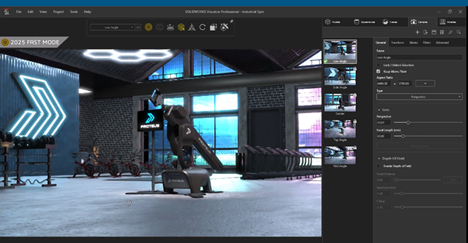
                        Download

                          Download

                            Download